Field Operations Software: What Should a Modern Platform Include?
Field operations software keeps work outside the office organised, visible and provable. If your team visits customers, installs equipment, delivers goods or collects payments, a phone call and a spreadsheet won’t show you what happened that day. However, with so many tools on the market, it is hard to tell which features matter and which are filler.
This guide explains what a modern platform should include and why each capability matters. It also gives you a practical way to evaluate your options.
What Is Field Operations Software?
Field operations software is a digital platform that helps businesses assign, track, verify and analyse the work of employees who operate outside the office. It usually combines a mobile app for field staff with a web console for managers.
This category overlaps with field service management software, field workforce management software and field force management software. In practice, these labels often describe the same core idea. Some tools, however, focus only on service jobs, while others focus on sales visits or attendance. Therefore, check what a platform actually covers instead of relying on its name.
A GPS tracker shows where people are. A field operations platform also shows why they are there, what they did and what happened next.
Why Spreadsheets and Chat Groups Stop Working
Most teams start with WhatsApp groups, paper registers and spreadsheets. At first, this works. As the team grows, however, three problems appear:
- Blind spots: Managers can’t see who is at which customer, or whether a visit happened at all.
- Admin overload: Attendance, updates and expense claims are scattered across chats and sheets, so hours disappear into paperwork.
- No usable data: Without clean visit and SLA data, coaching and planning turn into guesswork.
As a result, money leaks through missed visits, inflated claims and delayed collections. A modern platform is built to close exactly these gaps.
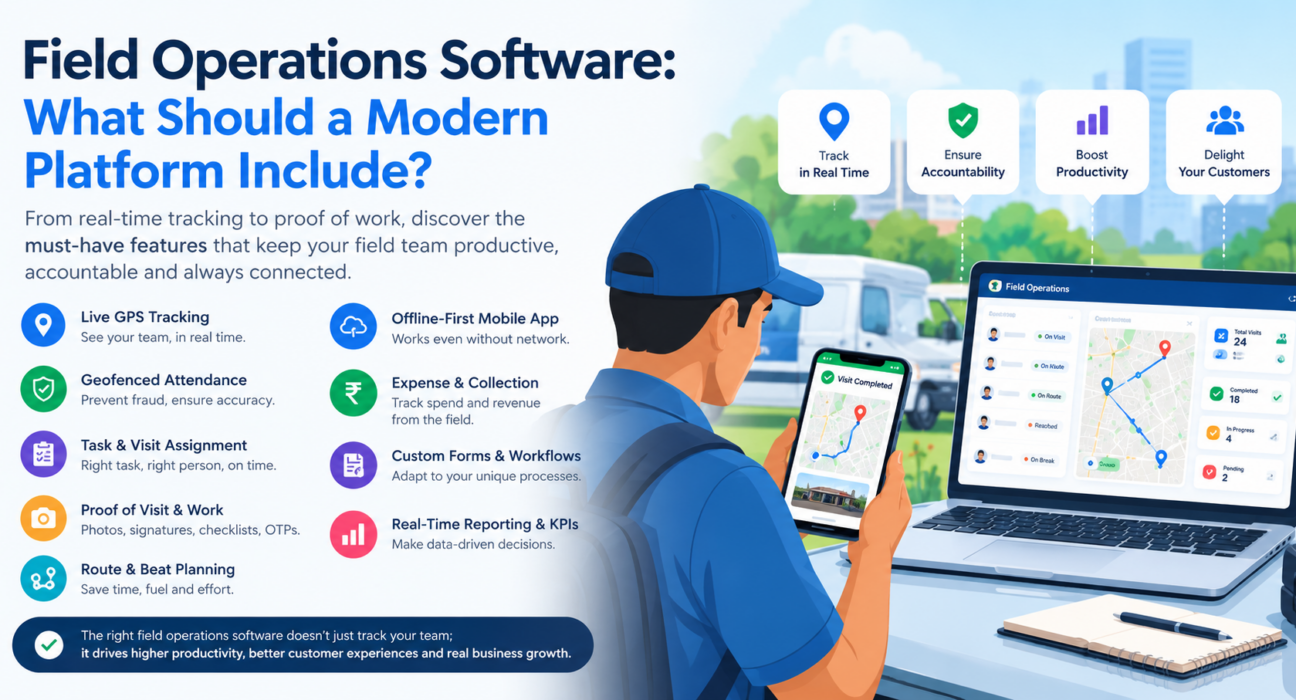
9 Features a Modern Field Operations Software Should Include
1. Live GPS Tracking on One Map
Managers should see every rep, route and visit status in real time. A GPS breadcrumb trail is also useful, because it shows where each person actually went during the day. Consequently, you can answer customer queries and resolve disputes with data instead of memory.
2. Geofenced Attendance With Fraud Protection
Attendance is where many field teams lose trust. Look for punch-ins stamped with server time, so changing the phone clock does not help. In addition, geofencing should confirm the location, and mock-location detection should flag spoofing attempts.
3. Task and Visit Assignment With SLAs
Managers should be able to create a task with a checklist, priority and deadline, and send it to the right person instantly. Furthermore, SLA timers show which jobs are at risk before a customer complains. Smart suggestions based on location and workload make dispatch faster still.
4. Proof of Visit and Proof of Work
“I visited” isn’t evidence. A strong platform captures photos, signatures, OTPs and checklists before a job can close. This gives you proof of presence (where the rep was) and proof of work (what the rep did).
5. Route and Beat Planning
Unplanned routes waste fuel and time. Therefore, look for beat-plan and route optimisation, with distance and ETA for each stop and easy navigation to the next customer. FieldExecutives states that AI-optimised routes can cut travel time by 20–30%, though it notes that such figures are illustrative and not guaranteed.
6. Offline-First Mobile App
Network coverage is unreliable in many field locations. For that reason, the app must let reps punch in, complete visits and capture photos without a connection. Data should then sync automatically when the phone reconnects.
7. Expense and Collection Management
Money tracking belongs in the same system as visits. Ideally, expense claims carry photo receipts and move through an approval flow to reimbursement. Similarly, collections should be tracked from the field to settlement, so nothing sits in a spreadsheet.
8. Custom Forms and Workflows
No two field teams work the same way. A courier run, a pharma visit and an AMC service call all need different data. So choose a platform that lets you build forms, job types, checklists and approvals without writing code.
9. Real-Time Reporting and KPIs
Data is only useful when managers can act on it. Look for live dashboards, KPI targets, leaderboards and exportable reports. Also confirm that role-based access and audit trails are in place, so the right people see the right information.
Field Operations Software Feature Checklist
| Feature | Problem it solves | Question to ask a vendor |
|---|---|---|
| Live GPS map | No visibility once the team leaves | Can I see live status and a route trail? |
| Geofenced attendance | Fake or unverified punch-ins | Does it use server time and detect mock GPS? |
| Task and SLA management | Missed or late jobs | Can I set priorities, checklists and SLA timers? |
| Proof of visit | Visits without evidence | Which proof types are mandatory before closing? |
| Route and beat planning | Wasted travel time | Does it optimise routes and show ETAs? |
| Offline mode | Lost data in weak networks | What works with no connection? |
| Expenses and collections | Leakage and slow settlement | Is the approval flow receipt-backed? |
| Custom forms | Rigid, one-size-fits-all tools | Can I build forms without code? |
| Reporting and KPIs | Decisions made on guesswork | Are dashboards real-time and role-based? |
How to Evaluate Field Operations Software
To choose the right platform, match its capabilities to your real field workflows, then test it with your own team. Here is a simple process:
- Map your workflows. First, list what your reps do daily, such as visits, deliveries, installations or collections.
- Separate must-haves from nice-to-haves. Next, decide which features solve your biggest losses today.
- Test the mobile app with real reps. Then check how it behaves in low-network areas and on ordinary phones.
- Review manager reporting. Also make sure the console answers your daily questions quickly.
- Check integrations. If you use a CRM, ERP, accounting or HR system, confirm how data will flow between tools.
- Understand the pricing model. Finally, compare costs based on the number of field users you will actually have.
It is also wise to run a short pilot with one team before rolling out company-wide.
Common Mistakes When Choosing a Platform
- Buying a tracker, not a platform. Location alone won’t fix missed visits, delayed claims or SLA failures.
- Ignoring the field rep’s experience. If the app is slow or confusing, adoption drops, and your data becomes unreliable.
- Over-customising on day one. Start with core workflows, then expand once the team is comfortable.
- Skipping change management. Explain to reps what is tracked and why, and note that location features should apply only to on-duty staff who have granted permission.
How FieldExecutives Supports Modern Field Operations
Businesses looking to simplify these processes can use field force management software such as FieldExecutives. It brings the capabilities above into one platform, with a mobile app for field executives, a web console for managers and an admin portal for business owners.
According to its website, the platform includes:
- Live GPS tracking on a single map
- Geofenced, server-time attendance with spoof detection
- Task assignment with checklists and SLA monitoring
- Photo, signature and OTP proof capture
- AI-based route and beat-plan optimisation
- An offline-first mobile app
- Expense and collection workflows
- A no-code custom forms builder
- Real-time KPIs and reports
Because it is configurable, teams in areas such as field service and repair, FMCG distribution, logistics and collections can shape it around their own workflows. You can review the full feature list to see how these capabilities fit your operations.
Conclusion
Good field operations software does more than show dots on a map. It assigns work, verifies attendance and visits, plans routes, tracks money and turns everything into reports you can act on. Without those pieces, field teams stay hard to manage and even harder to improve.
Start by listing your biggest field problems, then use the checklist above to test each platform against them. If you want to see how one connected system handles those needs, explore FieldExecutives and see how it fits your field operations.
Field Operations Software: What Should a Modern Platform Include?
Field operations software keeps work outside the office organised, visible and provable. If your team visits customers, installs equipment, delivers goods or collects payments, a phone call and a spreadsheet won’t show you what happened that day. However, with so many tools on the market, it is hard to tell which features matter and which are filler.
This guide explains what a modern platform should include and why each capability matters. It also gives you a practical way to evaluate your options.
What Is Field Operations Software?
Field operations software is a digital platform that helps businesses assign, track, verify and analyse the work of employees who operate outside the office. It usually combines a mobile app for field staff with a web console for managers.
This category overlaps with field service management software, field workforce management software and field force management software. In practice, these labels often describe the same core idea. Some tools, however, focus only on service jobs, while others focus on sales visits or attendance. Therefore, check what a platform actually covers instead of relying on its name.
A GPS tracker shows where people are. A field operations platform also shows why they are there, what they did and what happened next.
Why Spreadsheets and Chat Groups Stop Working
Most teams start with WhatsApp groups, paper registers and spreadsheets. At first, this works. As the team grows, however, three problems appear:
- Blind spots: Managers can’t see who is at which customer, or whether a visit happened at all.
- Admin overload: Attendance, updates and expense claims are scattered across chats and sheets, so hours disappear into paperwork.
- No usable data: Without clean visit and SLA data, coaching and planning turn into guesswork.
As a result, money leaks through missed visits, inflated claims and delayed collections. A modern platform is built to close exactly these gaps.
9 Features a Modern Field Operations Software Should Include
1. Live GPS Tracking on One Map
Managers should see every rep, route and visit status in real time. A GPS breadcrumb trail is also useful, because it shows where each person actually went during the day. Consequently, you can answer customer queries and resolve disputes with data instead of memory.
2. Geofenced Attendance With Fraud Protection
Attendance is where many field teams lose trust. Look for punch-ins stamped with server time, so changing the phone clock does not help. In addition, geofencing should confirm the location, and mock-location detection should flag spoofing attempts.
3. Task and Visit Assignment With SLAs
Managers should be able to create a task with a checklist, priority and deadline, and send it to the right person instantly. Furthermore, SLA timers show which jobs are at risk before a customer complains. Smart suggestions based on location and workload make dispatch faster still.
4. Proof of Visit and Proof of Work
“I visited” isn’t evidence. A strong platform captures photos, signatures, OTPs and checklists before a job can close. This gives you proof of presence (where the rep was) and proof of work (what the rep did).
5. Route and Beat Planning
Unplanned routes waste fuel and time. Therefore, look for beat-plan and route optimisation, with distance and ETA for each stop and easy navigation to the next customer. FieldExecutives states that AI-optimised routes can cut travel time by 20–30%, though it notes that such figures are illustrative and not guaranteed.
6. Offline-First Mobile App
Network coverage is unreliable in many field locations. For that reason, the app must let reps punch in, complete visits and capture photos without a connection. Data should then sync automatically when the phone reconnects.
7. Expense and Collection Management
Money tracking belongs in the same system as visits. Ideally, expense claims carry photo receipts and move through an approval flow to reimbursement. Similarly, collections should be tracked from the field to settlement, so nothing sits in a spreadsheet.
8. Custom Forms and Workflows
No two field teams work the same way. A courier run, a pharma visit and an AMC service call all need different data. So choose a platform that lets you build forms, job types, checklists and approvals without writing code.
9. Real-Time Reporting and KPIs
Data is only useful when managers can act on it. Look for live dashboards, KPI targets, leaderboards and exportable reports. Also confirm that role-based access and audit trails are in place, so the right people see the right information.
Field Operations Software Feature Checklist
| Feature | Problem it solves | Question to ask a vendor |
|---|---|---|
| Live GPS map | No visibility once the team leaves | Can I see live status and a route trail? |
| Geofenced attendance | Fake or unverified punch-ins | Does it use server time and detect mock GPS? |
| Task and SLA management | Missed or late jobs | Can I set priorities, checklists and SLA timers? |
| Proof of visit | Visits without evidence | Which proof types are mandatory before closing? |
| Route and beat planning | Wasted travel time | Does it optimise routes and show ETAs? |
| Offline mode | Lost data in weak networks | What works with no connection? |
| Expenses and collections | Leakage and slow settlement | Is the approval flow receipt-backed? |
| Custom forms | Rigid, one-size-fits-all tools | Can I build forms without code? |
| Reporting and KPIs | Decisions made on guesswork | Are dashboards real-time and role-based? |
How to Evaluate Field Operations Software
To choose the right platform, match its capabilities to your real field workflows, then test it with your own team. Here is a simple process:
- Map your workflows. First, list what your reps do daily, such as visits, deliveries, installations or collections.
- Separate must-haves from nice-to-haves. Next, decide which features solve your biggest losses today.
- Test the mobile app with real reps. Then check how it behaves in low-network areas and on ordinary phones.
- Review manager reporting. Also make sure the console answers your daily questions quickly.
- Check integrations. If you use a CRM, ERP, accounting or HR system, confirm how data will flow between tools.
- Understand the pricing model. Finally, compare costs based on the number of field users you will actually have.
It is also wise to run a short pilot with one team before rolling out company-wide.
Common Mistakes When Choosing a Platform
- Buying a tracker, not a platform. Location alone won’t fix missed visits, delayed claims or SLA failures.
- Ignoring the field rep’s experience. If the app is slow or confusing, adoption drops, and your data becomes unreliable.
- Over-customising on day one. Start with core workflows, then expand once the team is comfortable.
- Skipping change management. Explain to reps what is tracked and why, and note that location features should apply only to on-duty staff who have granted permission.
How FieldExecutives Supports Modern Field Operations
Businesses looking to simplify these processes can use field force management software such as FieldExecutives. It brings the capabilities above into one platform, with a mobile app for field executives, a web console for managers and an admin portal for business owners.
According to its website, the platform includes:
- Live GPS tracking on a single map
- Geofenced, server-time attendance with spoof detection
- Task assignment with checklists and SLA monitoring
- Photo, signature and OTP proof capture
- AI-based route and beat-plan optimisation
- An offline-first mobile app
- Expense and collection workflows
- A no-code custom forms builder
- Real-time KPIs and reports
Because it is configurable, teams in areas such as field service and repair, FMCG distribution, logistics and collections can shape it around their own workflows. You can review the full feature list to see how these capabilities fit your operations.
Conclusion
Good field operations software does more than show dots on a map. It assigns work, verifies attendance and visits, plans routes, tracks money and turns everything into reports you can act on. Without those pieces, field teams stay hard to manage and even harder to improve.
Start by listing your biggest field problems, then use the checklist above to test each platform against them. If you want to see how one connected system handles those needs, explore FieldExecutives and see how it fits your field operations.