Introduction
Most PG owners check rent and occupancy in bits and pieces: a look at the pending list here, a call to the manager there. But without a single monthly summary, it is hard to see whether the business is improving. A PG business performance report puts your key numbers on one page, so you can compare months, spot problems early, and make decisions with facts.
This guide shows what to include, how to calculate each figure, and how to lay it out. You will also see a worked example and a simple monthly routine. Using PG and hostel management software makes gathering the data easier, but the format works with any organized records.
What Is a PG Business Performance Report?
A PG business performance report is a monthly summary of how your PG performed on occupancy, rent, expenses, profit, tenant movement, and complaints. It compares the current month with the previous one, highlights what changed, and lists actions for the next month.
It is not a full accounting statement. Think of it as a one-page dashboard that answers three questions: How did we do? What changed? What should we fix next?
Step 1: Decide Who Will Read It and How Often
Before you build the report, be clear about its purpose.
- Owners want profit, cash flow, and growth.
- Managers want a list of pending rent, vacant beds, and open complaints.
- Partners or investors want trends and profit per bed.
Produce it once a month, within the first week after month-end, once all rent and expenses are recorded. Keep the format identical every month. Consistency is what makes trends visible.
If you run multiple buildings, create one report per property and then a combined summary.
Step 2: Include These Seven Sections
1. Occupancy summary
Occupancy rate is the percentage of your total beds that are filled.
Occupancy rate = (Occupied beds ÷ Total beds) × 100
Include:
- Total beds, occupied beds, and vacant beds
- Occupancy rate for the month
- Movement: new move-ins and move-outs
- Beds unavailable due to repairs, if any
If possible, use the monthly average rather than only the last-day figure.
2. Rent collection summary
This shows how well you converted billed rent into cash.
Collection efficiency = (Rent collected ÷ Rent billed) × 100
Include:
- Rent billed
- Rent collected (split by cash and UPI)
- Pending rent and the number of tenants with dues
- Tenants who paid late and by how many days
Keep refundable security deposits out of this section. They are not income.
3. Income summary
List all earned income:
- Rent collected
- Fines or late fees, if you charge them
- Food or mess charges, if applicable
- Other charges
The total is your monthly income.
4. Expense summary
Group expenses by category so patterns are easy to see:
- Building lease or rent
- Staff salaries
- Food and kitchen
- Electricity and water
- Repairs and maintenance
- Internet, housekeeping, and other costs
Add irregular costs, such as painting or appliance replacement, as a monthly average so they do not distort one month.
5. Profit summary
Net profit = Total income − Total expenses
Profit margin = (Net profit ÷ Total income) × 100
Profit per bed = Net profit ÷ Total beds
Profit per bed is especially helpful when comparing buildings of different sizes.
6. Tenant movement and retention
Monthly churn = (Tenants who vacated ÷ Occupied beds at the start of the month) × 100
Include move-ins, move-outs, and any notes on why tenants left. High churn shows up here before it shows up in profit.
7. Complaints and maintenance
Include:
- Complaints raised this month
- Complaints resolved and still open
- Most common complaint types
- Average time to close
Repeated complaints for the same issue are a sign of a maintenance or management gap.
Step 3: See a Worked Example
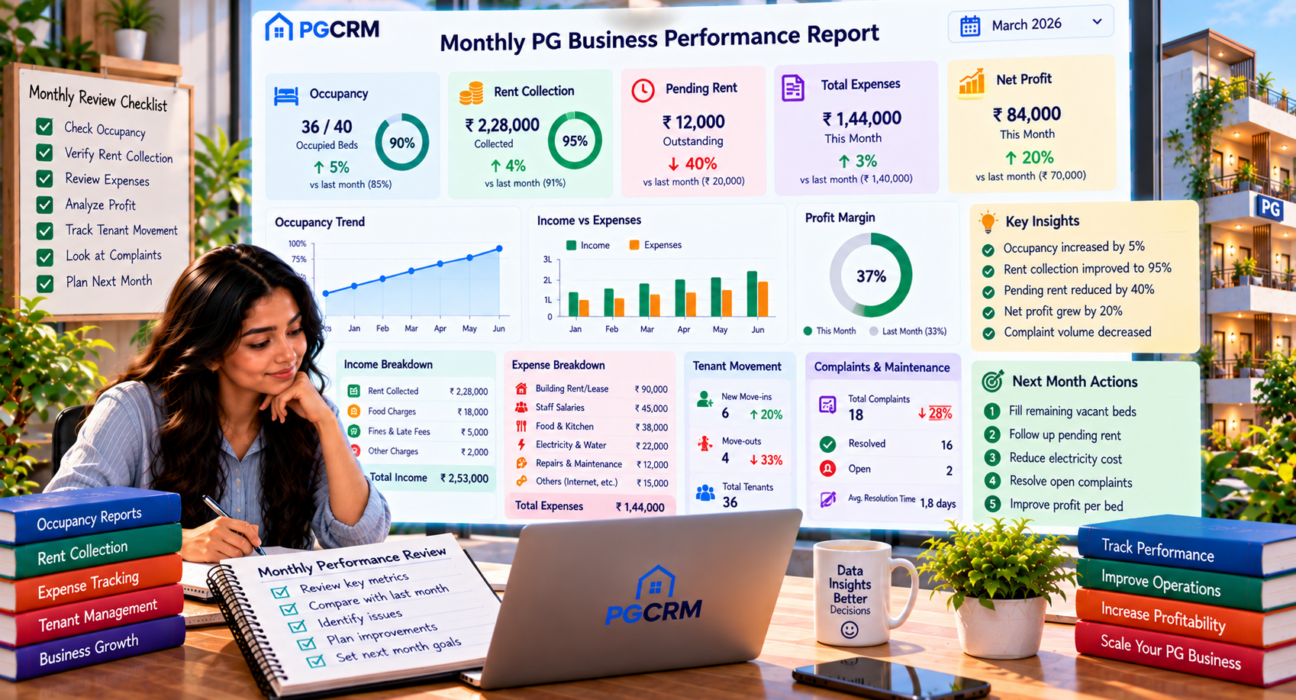
The figures below are illustrative, not real data. Imagine a 40-bed PG comparing two months.
| Metric | Last month | This month | Change |
|---|---|---|---|
| Occupied beds (of 40) | 34 | 36 | +2 |
| Occupancy rate | 85% | 90% | +5 points |
| Rent billed | ₹2,30,000 | ₹2,40,000 | +~4% |
| Rent collected | ₹2,10,000 | ₹2,28,000 | +~8.6% |
| Collection efficiency | ~91% | 95% | +4 points |
| Pending rent | ₹20,000 | ₹12,000 | −₹8,000 |
| Total expenses | ₹1,40,000 | ₹1,44,000 | +~3% |
| Net profit | ₹70,000 | ₹84,000 | +20% |
| Profit margin | ~33% | ~37% | +4 points |
| Profit per bed | ₹1,750 | ₹2,100 | +₹350 |
Expense breakdown for this month:
| Category | Amount | Share |
|---|---|---|
| Building lease | ₹60,000 | ~42% |
| Staff | ₹32,000 | ~22% |
| Food and kitchen | ₹30,000 | ~21% |
| Electricity and water | ₹12,000 | ~8% |
| Repairs | ₹6,000 | ~4% |
| Other | ₹4,000 | ~3% |
| Total | ₹1,44,000 | 100% |
Tenant and complaint summary: 4 move-ins, 2 move-outs (monthly churn about 6%), and 12 complaints raised, 10 resolved, 2 still open.
Key takeaways written for the owner:
- Profit rose 20% because collected rent grew faster than expenses.
- Occupancy and collection both improved, so growth was healthy.
- Lease is the largest cost, so the next lever is occupancy, not small cuts.
- Two open complaints need follow-up before they become move-outs.
Step 4: Add a Short Commentary and Action List
Numbers alone do not make a report useful. Add a short section at the end with three parts.
- What went well. Example: “Occupancy reached 90% and pending rent dropped.”
- What needs attention. Example: “Two complaints remain open; electricity cost is up.”
- Actions for next month. Keep to two or three, with an owner and a date.
Sample actions:
- Follow up on ₹12,000 pending rent by the 10th (manager)
- Close the two open complaints within a week (manager)
- Check electricity use in empty rooms (owner)
A Simple Monthly Routine to Build the Report
- Close the month. Make sure every cash and UPI payment and every expense is recorded.
- Confirm bed counts. Verify total, occupied, and vacant beds, plus move-ins and move-outs.
- Pull the figures. Collect rent billed, rent collected, pending dues, and expenses by category.
- Calculate the key metrics. Occupancy, collection efficiency, net profit, margin, profit per bed, and churn.
- Compare with last month. Note changes in numbers and percentage points.
- Write the commentary. Highlights, concerns, and actions.
- Share and review. Discuss with your manager and assign actions.
Once the routine is set, the report should take much less time each month.
Common Mistakes in a PG Business Performance Report
- Reporting billed rent as income. Only collected rent counts.
- Including deposits in revenue. Refundable deposits inflate results.
- Changing the format every month. You lose the ability to compare.
- Reporting totals without percentages. Rates and per-bed figures show efficiency.
- Leaving out expenses by category. A single total hides where money goes.
- Skipping the action list. A report that does not lead to action is just a record.
- Using data recorded late. Missing entries make the report unreliable.
How PG Management Software Helps
The report itself is simple. The slow part is collecting accurate data from notebooks, chats, and spreadsheets.
PG management software such as PGCRM can help by keeping buildings, rooms, beds, tenants, rent, and expenses in one place. According to the PGCRM website, it provides occupancy reports, income and expense reports, expense tracking by category and building, a live pending rent list, daily check-in and check-out counts, and complaint tracking with open and resolved status. It also supports manager logins with limited access, and gives a single view across multiple buildings. Those records supply most of the figures a monthly report needs.
| Report section | Data needed | Where software helps |
|---|---|---|
| Occupancy | Occupied and total beds | Occupancy reports |
| Rent collection | Billed vs collected, pending | Live pending list, cash and UPI records |
| Income and expenses | Income and costs by category | Income and expense reports, expense tracking |
| Tenant movement | Move-ins and move-outs | Check-in and check-out counts |
| Complaints | Open and resolved issues | Complaint tracking |
| Multiple buildings | Data from each property | One view across buildings |
Software does not write your commentary or decide your actions. It gives you reliable numbers faster.
Frequently Asked Questions
What should a PG business performance report include?
It should include occupancy, rent billed and collected, pending rent, income, expenses by category, net profit, profit per bed, tenant move-ins and move-outs, and complaint status. Add a short commentary and an action list so the report leads to decisions, not just numbers.
How often should I prepare a PG performance report?
Prepare it monthly, within the first week after month-end, once all rent and expenses are recorded. Add a quarterly and yearly review to spot longer trends and seasonal patterns. Monthly reports catch problems early, while longer reviews show real direction.
How do I calculate profit in a PG monthly report?
Subtract total operating expenses from total income for the month. Use rent actually collected, not billed, and exclude refundable deposits. Then divide net profit by total beds to get profit per bed, and by income to get profit margin.
What is the most important number in a PG report?
Net profit per bed is often the most useful, because it combines pricing, occupancy, collections, and costs, and it lets you compare properties fairly. Still, read it alongside occupancy and collection efficiency to understand what is driving the result.
Can I make a PG report in Excel?
Yes. A spreadsheet works if you record rent and expenses consistently and use the same template each month. The challenge is keeping data accurate across notebooks and messages. Software that stores rent, expenses, and occupancy in one place can reduce manual entry and errors.
How do I report on multiple PG properties?
Create the same report for each building, then add a combined summary. Use percentages and per-bed figures so buildings of different sizes can be compared fairly. Keep definitions identical across properties, including how shared expenses are split.
Can PG software generate performance reports?
It can help with the data behind them. PGCRM, for example, offers occupancy reports, income and expense reports, and expense tracking by category and building. You may still add your own commentary and actions, but the core figures are easier to gather.
Conclusion
A good PG business performance report is short, consistent, and action-oriented. Cover occupancy, rent collection, expenses, profit, tenant movement, and complaints, compare each figure with last month, and end with two or three clear actions. Over time, these reports show what is working and what is quietly hurting your business.
Reliable reports depend on organised records. To keep your buildings, tenants, rent, and expenses in one place, explore PGCRM to simplify your PG and hostel management.