Introduction
A PG with ten rooms is easy to run. A PG with ten rooms that come as single, double, triple and four-sharing, some with AC, some with attached bathrooms, is a different job. Prices differ, vacancies get messy, and one half-filled triple room can quietly cost you more than an empty single.
Good PG room type management comes down to three things: knowing what each room type is worth, tracking every bed instead of just every room, and keeping your records clean when tenants move around. This guide walks through how to do that, using simple tools first. If you later want PG and hostel management software to carry the load, you’ll already know what to set up.
What Is PG Room Type Management?
PG room type management is the process of organizing your rooms by type (single, double, triple, or more sharing), setting the right rent and deposit for each, and tracking bed-level occupancy so you know exactly what is filled, vacant, or under repair at any time.
The key idea is simple. Rent is earned per bed, not per room. A triple-sharing room is three sellable units. If you only track the room, you’ll never see the gaps.
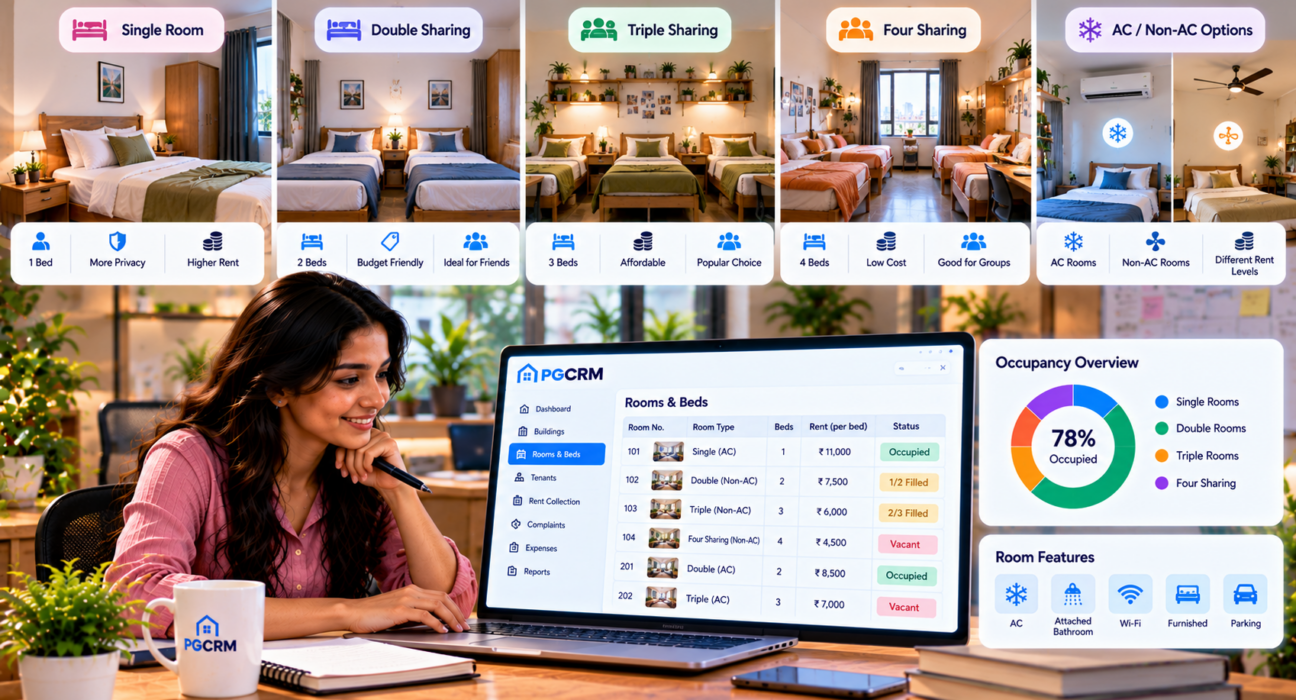
Common PG Room Types and Sharing Options
Names vary across cities, but most PGs use some mix of these.
| Room type | Beds | Typical tenant | Main challenge |
|---|---|---|---|
| Single occupancy | 1 | Working professionals wanting privacy | Highest rent, so a vacancy hurts most |
| Double sharing | 2 | Students, early-career professionals | Matching two compatible tenants |
| Triple sharing | 3 | Students, budget-conscious tenants | Uneven filling, noise, storage space |
| Four or more sharing | 4+ | Budget stays, short-term tenants | Hygiene, privacy complaints, turnover |
| AC and non-AC variants | Any | Depends on budget | Power costs and different rent levels |
| Attached vs common bathroom | Any | Depends on comfort needs | Different pricing and cleaning effort |
You don’t need to offer all of these. Many good PGs run just two or three room types and do them well. More variety means more tracking, so add types only when there’s real demand.
How to Price Different Room Types
Pricing is where most owners go wrong first. Setting rent by feel usually leaves one room type underpriced and another sitting empty.
Start with the cost per bed
Work out what each bed has to earn. Add up rent or EMI, electricity, water, Wi-Fi, staff, food (if you serve it), maintenance and cleaning. Divide by the number of beds you have. That’s your rough break-even per bed. Every room type should price above it.
Price the privacy, not just the space.
Tenants pay extra for fewer roommates. A single room isn’t just double the rent of a double-sharing room in the tenant’s mind. It’s a premium for privacy. The reverse is true too: a four-sharing bed should be noticeably cheaper, or people will pick double sharing instead.
A quick illustration (numbers are only for the example): if a bed in a triple room is ₹6,000, a double-sharing bed might sit around ₹7,500 and a single around ₹11,000. The gaps matter more than the exact figures. Check what similar PGs near you charge before you settle on yours.
Set deposits by room type.
Deposits don’t have to be the same for every room. Many owners keep a deposit tied to monthly rent, so a single room carries a larger deposit than a triple. Whatever rule you choose, write it down and apply it the same way every time. It saves arguments during settlement.
How to Set Up Rooms and Beds Properly
Here is the process I’d follow for any PG, whether it lives in a notebook or an app.
- List every building and floor.
- Number every room with a simple, unique code (101, 102, 201 and so on).
- Assign each room a type (single, double, triple, and so on).
- Label every bed inside the room (A, B, C).
- Note the features of each room: AC, attached bathroom, balcony, furnishing.
- Set the rent and deposit for each bed.
- Mark the current status of each bed: occupied, vacant, reserved, or under repair.
Step 4 is the one people skip, and it’s the most useful. Once beds are labeled, you can say “Room 203, Bed C is free” instead of “one bed is free somewhere on the second floor.” You can also tie each tenant, payment and complaint to a specific bed.
Managing Occupancy Across Sharing Types
Different room types fill differently. Singles tend to fill fully or not at all. Triples and four-sharing rooms fill one bed at a time, which is where problems begin.
Deal with partially filled rooms.
A triple room with one tenant is earning a third of its potential. Some owners fill the empty beds quickly at a small discount. Others hold the room until a group arrives. Neither is wrong, but you should choose deliberately and look at the numbers. Ask: Which rooms have been partly empty for more than a month?
Keep gender and category rules clear.
Most PGs are boys-only, girls-only, or split by floor or building. Never leave this to memory. Mark each room or floor with who it’s meant for, so a new admission is never placed in the wrong section by mistake. If you run both a men’s and a women’s building, keep their records visibly separate.
Handle room shifts and upgrades.
Tenants ask to move. Someone wants a single after six months. Someone else wants out of a noisy triple. Treat these as formal changes:
- Confirm the new room is actually free.
- Update the rent from the date of the move, not from a vague “next month.”
- Adjust the deposit difference if your rule needs it.
- Update the old bed’s status right away so it can be rented again.
The most common error here is a bed that stays marked “occupied” after the tenant has moved. It disappears from your vacancy list and you lose weeks of rent without noticing.
Plan for vacates and turnover.
When someone leaves, the bed shouldn’t jump straight back to “available.” Give it a short buffer: cleaning, quick repairs, a check of the mattress and cupboard. Marking it “under repair” for a day or two keeps the record honest.
Keeping Tenants Fair and Happy Across Room Types
Tenants compare notes. If two people in identical rooms pay different rent with no clear reason, you’ll hear about it. A few habits help:
- Publish a simple rate card by room type so nobody guesses.
- Explain what’s included in each type (furniture, AC hours, bathroom access).
- Be consistent with rent hikes. Announce them in advance and apply them by room type, not person by person.
- Log complaints by room. If Room 305 keeps having AC trouble, it’s time to fix or reprice that room.
- Match roommates sensibly where you can, such as similar work hours or student vs professional groups.
Common Mistakes in PG Room Type Management
- Tracking rooms, not beds. You’ll never know your real occupancy.
- Too many room types. Every extra variant adds tracking work.
- Underpricing singles. Privacy is your premium product.
- Forgetting to update status after a move. Vacant beds stay hidden.
- No written rate card. Rent becomes a negotiation every time.
- Ignoring rooms that stay half-empty. They drain income slowly.
- Mixing up deposits. Keep the rule uniform and recorded.
Manual Tracking vs Software
| Task | Register or spreadsheet | Management software |
|---|---|---|
| Bed-level occupancy | Manual updates, easy to miss | Live status for every bed |
| Room shifts | Edit several places by hand. | Recorded as one change |
| Rent by room type | Calculated manually | Set per room and bed |
| Multiple buildings | Separate files | Combined view |
| Vacancy reports | Counting by hand | Report on demand |
| Staff access | Shared book or file | Separate logins |
A spreadsheet works fine up to a point. Once you’re editing it daily across floors and buildings, mistakes creep in.
How PG Management Software Helps
Software won’t decide your prices for you, but it can keep the moving parts in one place. PGCRM, for example, lets you add your buildings, floors, rooms, and beds and set rent and deposit for them. From there, you can see what’s full, free, or under repair; add tenants with their KYC and joining date; and handle room shifts, vacates, and settlements.
Its occupancy reports show how your beds are filling, and if you have staff, manager logins let them work with limited access. If you offer meals separately, it also supports mess-only admissions.
Check the features page for the full list, and confirm with the team how your specific room types and pricing would be set up.
Frequently Asked Questions
What are the common room types in a PG?
Most PGs offer single occupancy, double sharing, triple sharing, and four-plus sharing rooms. Some also separate rooms by AC or non-AC and by attached or common bathroom. You don’t need every type. Start with the ones your local tenants ask for most.
How do I price single, double, and triple sharing rooms?
First, calculate your cost per bed, including rent, utilities, staff, and maintenance. Price every room type above that. Add a premium for privacy, so single rooms cost the most per bed, and triple or four-sharing rooms cost the least. Compare with nearby PGs before finalizing.
Is it better to have more single rooms or shared rooms?
It depends on your area and tenants. Singles earn more per bed but are harder to fill if demand is low. Sharing rooms suits students and budget renters and gives steady demand. Many owners run a mix and adjust based on which types stay vacant longest.
How do I track bed-level occupancy in a PG?
Give every room a number and every bed a letter, then record each bed’s status: occupied, vacant, reserved, or under repair. Update it whenever someone joins, leaves, or shifts. A spreadsheet works for a small PG, and software makes it easier as you grow.
What should I do when a tenant wants to change rooms?
Confirm the new bed is free, update the rent from the move date, adjust the deposit if your policy requires, and mark the old bed as vacant immediately. Keep the change in your records so payments and history stay accurate.
Should deposits be different for different room types?
Many owners tie the deposit to monthly rent, so single rooms carry a higher deposit than shared rooms. It’s not compulsory. What matters is a clear, consistent rule that you explain in the rental agreement and apply to everyone.
Conclusion
PG room type management isn’t complicated, but it does need discipline. Know what each room type earns, track beds instead of just rooms, keep pricing and deposits consistent, and update your records the moment anything changes. Do that and most of the usual headaches, like hidden vacancies, pricing disputes and confusing room shifts, get much smaller.
If your notebook or spreadsheet is starting to fight you, take a look at PGCRM. Explore PGCRM to simplify your PG and hostel management.