Sales Automation Software: Automate Your Sales Process
Sales executives often spend more time on admin than on selling. They copy leads into sheets, set reminders by hand, update statuses, send the same message again and again, and write daily reports. Each task is small, but together they eat hours every week. With the right sales automation software, many of these repeated tasks can run by themselves, so the team can spend more time talking to customers.
This guide explains what sales automation software is, what it can and cannot do, how to set it up step by step and how to choose a tool for your team.
What Is Sales Automation Software?
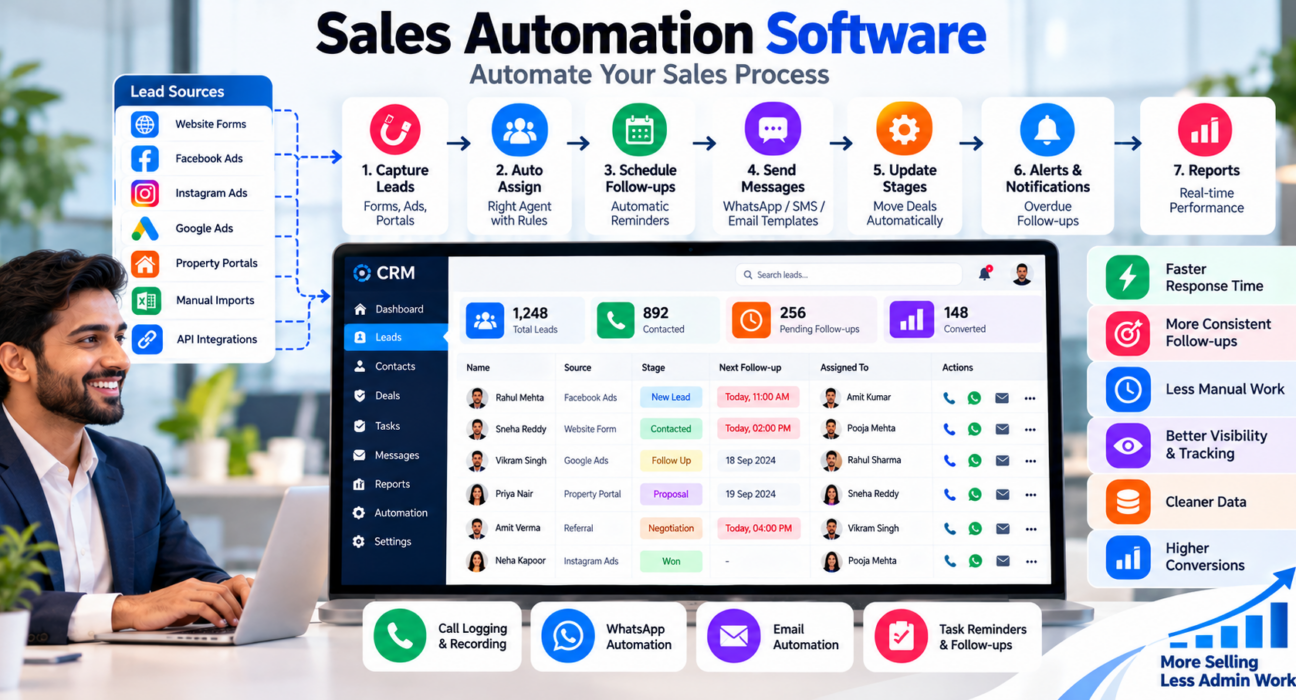
Sales automation software is a tool that automates repetitive sales tasks, such as capturing leads, assigning them to agents, scheduling follow-ups, sending messages and updating deal stages. It works through rules and triggers, so the team spends less time on manual admin and gets more consistent follow-up.
Most sales automation tools are part of a CRM (Customer Relationship Management) system. The CRM stores lead and customer data, and the automation layer acts on that data. For example: “When a new lead arrives from Facebook, assign it to an agent and create a follow-up for today.”
What Can Be Automated in Sales?
Not everything should be automated, but many tasks are good candidates.
| Sales task | What automation can do |
|---|---|
| Lead capture | Bring leads in from forms, ads and portals without manual entry |
| Lead assignment | Give each new lead to an agent by rules |
| Follow-up scheduling | Create reminders and callbacks after each stage change |
| Messaging | Send WhatsApp, SMS or email templates at set points |
| Data entry | Log calls, outcomes and notes automatically |
| Stage updates | Move a lead to the next stage when a condition is met |
| Alerts | Notify managers about overdue follow-ups or high-value leads |
| Reporting | Build daily or weekly reports without spreadsheets |
What Should Not Be Fully Automated
Automation works best on repeated, predictable tasks. Some parts of selling still need a human:
- Understanding the customer’s real need. A rule cannot hear hesitation in someone’s voice.
- Negotiation and objection handling. These need judgement and trust.
- Sensitive conversations. Complaints, payment problems or difficult news should be handled personally.
- Highly personal follow-ups. A generic message to a high-value lead can look careless.
A good rule is to automate the process around the conversation, not the conversation itself.
Benefits of Sales Automation Software
- Faster response. New leads are assigned and flagged in seconds.
- More consistent follow-up. Reminders and rules reduce missed callbacks.
- Less manual work. Agents spend less time on data entry and admin.
- Better visibility. Managers see pipeline, activity and overdue work without asking.
- Cleaner data. Automatic logging reduces missing or inconsistent records.
- Easier scaling. Processes keep working as the team and lead volume grow.
These benefits depend on good setup and regular use. Software does not fix a weak offer, poor calling skills or unclear processes.
How to Automate Your Sales Process: 8 Steps
Step 1: Map your current sales process
Write down every step from lead capture to closing. For example: enquiry, first call, follow-up, proposal, negotiation, won or lost. Note where delays or mistakes happen.
Step 2: Find repetitive tasks
Look for tasks done many times a day in the same way, such as assigning leads, sending brochures or setting reminders. These are the best first candidates.
Step 3: Define clear stages and outcomes
Automation needs clean inputs. Define your lead stages and call outcomes, and keep the list short, so agents can choose quickly.
Step 4: Start with three to five automations
Do not automate everything at once. Good starting points are:
- Auto-assign new leads to an owner.
- Create a follow-up task after each call outcome.
- Send a WhatsApp or SMS message after a first call.
- Alert the manager when a follow-up is overdue.
- Move the lead to a new stage when a specific action happens.
Step 5: Write good message templates
If you automate messages, keep them short, relevant and clear. Include the sender’s name and a simple next step. Avoid sending too many messages.
Step 6: Test with a small group
Try the rules with one team or a sample of leads. Check that leads go to the right person, and that messages and reminders trigger correctly.
Step 7: Train the team
Explain to agents what is automated, what is still their job and how to log outcomes properly. Automation only works if the data entered is accurate.
Step 8: Review and improve every month
Check which automations save time, which cause problems and which should be changed. Remove rules that no longer serve a purpose.
Examples of Automation by Industry (Hypothetical)
These examples are illustrations only.
- Real estate: A portal lead is assigned to the agent for that city, and the agent gets a follow-up task for the same day. After a site visit, the stage changes and a follow-up is created for three days later. This fits a real estate CRM workflow.
- Education: An enquiry after a Facebook ad is assigned to a counsellor, who receives a reminder to call. A WhatsApp message with course details goes out after the first call.
- Insurance: A renewal reminder is created a month before policy expiry, with a follow-up task for the agent.
- Recruitment: A candidate marked “interested” gets an interview reminder, and the recruiter is alerted if no reply arrives within a set time.
- B2B sales: A demo request creates a task for the sales executive, and the deal moves to “proposal sent” when a quotation is logged.
Common Mistakes to Avoid
- Automating a broken process. Fix the process first, otherwise automation only speeds up the mess.
- Too many automations at once. Start small and expand gradually.
- Sending too many automated messages. Customers notice and may stop responding.
- Ignoring consent and DND rules. Check current Indian rules for calls and messages before automating outreach.
- No human review. Check that automated rules still make sense as products and teams change.
- Poor data quality. Rules fail if location, source or product fields are empty or wrong.
- Not training agents. If the team does not log outcomes, automations will not trigger correctly.
- Choosing tools by features alone. Pick based on your process, your team’s habits and your budget.
How to Choose Sales Automation Software
Ask these questions:
- Which tasks do we want to automate first, and does the tool support them?
- Can it capture leads from our sources automatically?
- Can we set rules without technical help?
- Does it handle lead assignment, follow-ups and stage changes?
- Can it send WhatsApp, SMS or email messages?
- Does it log calls if our team sells by phone?
- Can managers see reports and alerts?
- Is pricing clear for our team size, and are automation features included?
- Can we try it with real data before deciding?
Run a pilot with one team for a few weeks and compare results before rolling out widely.
How TeleCallingCRM Can Help
TeleCallingCRM is a CRM built for telecalling and outbound sales teams in India. Based on the information on its website, capabilities relevant to sales automation include:
- Automations and workflows: Rules to auto-assign leads, schedule follow-ups, send WhatsApp nudges and alert managers when a lead’s stage changes.
- Lead import and integrations: CSV import with de-duplication and DNC checks, plus integrations with Facebook and Instagram Lead Ads, Google Ads, WordPress, Wix, Google Sheets, Zapier and several Indian lead portals.
- Follow-ups: Scheduling, reminders, overdue alerts and recurring follow-ups.
- Call tracking: Calls are logged with duration, outcome, recording and notes.
- Lead scoring: Helps agents focus on likely prospects first.
- Sales pipeline: Custom stages and deal values.
- Messaging: WhatsApp templates, SMS and email.
- Reports and live monitoring: Analytics by agent and a real-time view of team activity.
- AI call analysis: Transcripts, summaries and action items after calls.
It is designed mainly for calling-led sales teams. If you need marketing automation, such as complex email campaigns or website tracking, check whether it fits before deciding, as the website does not describe these. Features and plans can change, so verify current details and try the product with your own leads.
Frequently Asked Questions
What is sales automation software?
Sales automation software automates repetitive sales tasks such as lead capture, assignment, follow-up reminders, messaging and stage updates. It uses rules and triggers, so agents spend less time on admin and managers get better visibility. It is usually part of a CRM.
What is the difference between sales automation and marketing automation?
Sales automation supports the sales team’s daily work, such as assigning leads, scheduling calls and tracking deals. Marketing automation focuses on attracting and nurturing leads at scale, for example through email campaigns and landing pages. Some platforms offer both, while others focus on one.
Is sales automation the same as a CRM?
Not exactly. A CRM stores customer and lead data and tracks the pipeline. Sales automation adds rules that act on that data, like auto-assigning leads or creating reminders. Most modern CRMs include some automation features.
Which sales tasks should I automate first?
Start with tasks that are repetitive and rule-based: lead capture, lead assignment, follow-up reminders, first-response messages and overdue alerts. These save time quickly and are easy to test. Leave negotiation and relationship-building to people.
Can small businesses use sales automation software?
Yes. Small teams often gain the most because they have limited time. Start with a few simple automations, such as assigning leads and creating follow-ups, and expand only when needed. Choose a tool with clear pricing and easy setup.
Will automation replace salespeople?
No. Automation handles routine tasks, but selling still depends on understanding customers, building trust and handling objections. The aim is to give salespeople more time for conversations, not to replace them.
How do I avoid annoying customers with automated messages?
Send only relevant messages, keep them short, limit frequency and give customers a way to opt out. Respect consent and DND rules, and personalise where possible. Review replies and complaints to adjust your templates.
How do I measure whether sales automation is working?
Track response time to new leads, follow-ups completed on time, time spent on admin, leads moved to the next stage and conversion rates. Compare these before and after automation, and use a pilot group to check the impact.
Conclusion
Sales automation software works best when it supports a clear process. Map your sales steps, automate the repetitive parts, keep human conversations human and review the rules regularly.
If your team sells mainly by phone, you can look at a telecaller CRM alongside one or two alternatives. Test each with real leads, check that the automations you need are supported and choose the tool your team will actually use.