Best CRM for Managing Telecaller Teams and Agents
Managing five telecallers is mostly conversation. Managing fifteen is mostly guesswork. You do not know who is on a call, who is idle, which leads were skipped or why one agent converts twice as well as another.
That is the gap telecaller management software fills. It gives managers one place to assign leads, watch activity, check call outcomes and coach agents with facts instead of impressions. A CRM for managing telecaller teams brings these functions together with calling and follow-ups, so agents and managers work from the same data.
What Is the Best CRM for Managing Telecaller Teams?
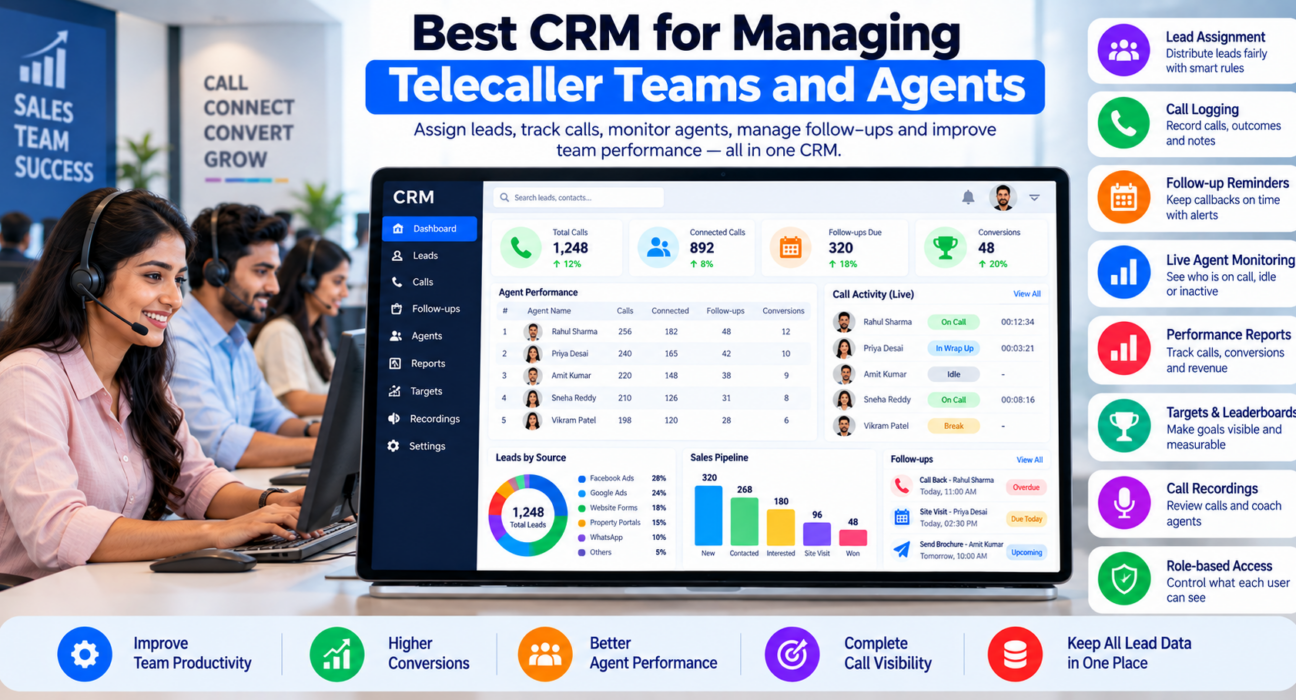
The best CRM for managing telecaller teams combines lead assignment, call logging, follow-up reminders, live agent monitoring, performance reports and role-based access in one tool. It should be simple enough for agents to use daily and give managers clear visibility without manual reporting.
The right choice depends on team size, call volume, lead sources and budget. A team of eight telecallers selling admissions needs different things from a 100-seat call centre.
What Is Telecaller Management Software?
Telecaller management software is a tool that helps managers organise, monitor and support a telecalling team. It covers lead distribution, call tracking, follow-up scheduling, agent activity monitoring, performance reporting and, in many cases, the dialer itself.
It is often part of a telecalling CRM. The CRM holds lead and call data, and the management features turn that data into daily decisions.
What Managers Struggle With Without It
- Uneven lead distribution. Some agents get the best leads, others get leftovers.
- No live visibility. You find out about idle time or low call volume at the end of the day.
- Missed follow-ups. Callbacks depend on each agent’s memory.
- Unreliable reports. Agents send numbers by WhatsApp, and managers compile them in Excel.
- Weak coaching. Without call records, feedback is based on opinion.
- Data leaves with people. When an agent resigns, their leads and notes go with them.
- Compliance risk. There is no consistent way to check DNC lists or store call recordings.
Key Features of Good Telecaller Management Software
| Feature | What it does for the manager |
|---|---|
| Lead import and assignment | Distributes leads by rules such as source, city or language |
| Duplicate and DNC checks | Prevents repeat calls and reduces compliance risk |
| Auto dialer or click-to-call | Reduces manual dialling time |
| Call logging | Records duration, outcome, notes and recordings |
| Follow-up reminders | Keeps callbacks on time, with overdue alerts |
| Live agent monitoring | Shows who is on a call, idle or inactive |
| Dashboards and reports | Shows calls, connections, conversions and revenue by agent |
| Leaderboards and targets | Makes goals visible and measurable |
| Call quality review | Helps coach agents using actual calls |
| Roles and permissions | Controls what agents, team leaders and managers can see |
| Mobile app | Supports remote and field agents |
You may not need every feature on day one. Start with lead assignment, call logging, follow-ups and basic reports, then add monitoring and coaching tools as the team grows.
How to Manage a Telecalling Team With Software: Step by Step
1. Define roles and access
Decide who is an agent, team leader, manager and admin. Give each person only the access they need. Agents usually should not see other agents’ leads or export the full database.
2. Set lead distribution rules
Write down how leads are shared. For example, by lead source, product, language, location or round-robin. Fair, clear rules reduce disputes.
3. Standardise call outcomes
Use a short list such as Not Answered, Interested, Call Back, Not Interested, Wrong Number and Won. This keeps reports clean and gives every call a next step.
4. Set daily targets
Pick a small set of targets, such as calls made, connected calls and follow-ups completed. Add outcome targets, such as appointments or conversions, based on lead quality.
5. Monitor activity during the day
Check live views for idle agents and call volume. Use this to support the team, not to micromanage. A quick message at 11 AM is better than a harsh review at 6 PM.
6. Review reports daily and weekly
- Daily: calls, connections, overdue follow-ups, idle time.
- Weekly: conversions, revenue, source-wise results, trends by agent.
7. Coach with call data
Pick a few calls per agent each week. Listen together and agree on one improvement, such as asking about budget earlier or confirming the next step.
8. Handle exits and leave
When an agent leaves or takes leave, reassign their leads and follow-ups from the CRM so nothing is lost.
Which Metrics Should Telecaller Managers Track?
Do not track everything. A practical set:
- Calls made and connected calls: Basic activity and reach.
- Talk time: Time spent in real conversations.
- Idle time: Gaps between calls.
- Follow-ups done on time vs overdue: Discipline in callbacks.
- Conversion rate: Share of leads that become customers.
- Revenue or deals won: Business outcome.
- Results by lead source: Which sources work for which agents.
Compare agents on similar lead types. An agent with cold lists will convert lower than one with inbound enquiries. For a deeper look, see our guide on how to track sales agent performance with CRM software.
Examples of Team Management in Practice
These are hypothetical examples to illustrate how the process works. They are not customer case studies.
Real estate: A manager sees from the live view that two agents have long idle gaps after lunch. A short check shows leads were not assigned for the afternoon. The manager adjusts assignment rules so each agent has a queue ready.
Education: A head of admissions notices one counsellor has many overdue follow-ups. The issue is that callbacks were not being scheduled at the end of calls. The team agrees that every call must end with a next step and date.
Insurance: A manager compares renewal and cold-lead conversions by agent, then assigns renewal leads to agents who handle them best.
Call centre: A team leader uses call recordings to coach new agents on script adherence and tone, reviewing a few calls per agent each week.
Common Mistakes When Managing Telecaller Teams
- Measuring only call volume. It encourages short, low-quality calls.
- Using monitoring to punish. Agents may hide issues or game the numbers.
- Unclear lead rules. Agents lose trust if lead distribution looks unfair.
- Too many statuses and fields. Agents skip data entry when the CRM is tiresome.
- No access control. Open access to the full database is a business and data protection risk.
- Ignoring compliance. Check DNC lists and follow the current TRAI rules for outbound calling. Inform agents that calls may be recorded and monitored, and follow applicable consent and privacy requirements.
- Not coaching. Reports without coaching do not improve performance.
How TeleCallingCRM Supports Telecaller Team Management
TeleCallingCRM is a telecalling CRM built for Indian outbound sales teams. Based on its website, relevant capabilities include:
- Leads and assignment: Import, auto-distribution, tagging, de-duplication and DNC checks, with lead scoring to help agents prioritise.
- Calling: A smart auto dialer, status-wise calling, call prioritisation, call recording and notes.
- Follow-ups: Reminders, overdue alerts and recurring follow-ups.
- Live War Room: A real-time view of agents, leads and revenue, showing talk time, utilisation and idle agents.
- Reports: Connection and answer rates, hourly heatmaps, leaderboards, benchmarking and targets, a custom report builder and exports to CSV, Excel and PDF.
- AI call analysis: Automatic transcription, summaries, sentiment, a quality score and coaching notes.
- Team controls: Role-based access, attendance and team alerts.
- Mobile app: For agents working outside the office.
You can read more about the live monitoring view in this post on TeleCallingCRM’s Live War Room and reports. Larger operations may find this guide on choosing call center CRM software useful, and the pricing page lists plans by team size.
It suits teams that work mainly through calls. If your team sells mostly through email or in-person meetings, compare it with other tools. Whatever you consider, test it with a small group of agents first.
Quick Checklist Before You Choose
- Can I assign leads by clear rules?
- Does it log every call with outcome and notes?
- Are there follow-up reminders and overdue alerts?
- Can I see what agents are doing live?
- Do reports show results by agent and source?
- Can I control who sees what?
- Does it support DNC checks and call recording?
- Is there a mobile app for remote agents?
- Is pricing clear for my team size, including GST?
- Can I try it with real leads?
Frequently Asked Questions
What is telecaller management software?
It is software that helps managers organise and monitor telecalling teams. It handles lead assignment, call logging, follow-ups, live activity tracking and performance reports. Many telecalling CRMs include these features along with calling tools such as an auto dialer.
How do I manage a telecalling team effectively?
Set clear lead rules, standard call outcomes and daily targets. Monitor activity during the day, review reports daily and weekly, and coach agents using real call data. Use a CRM so everyone works from the same records.
What features should I look for in a telecaller CRM?
Look for lead assignment, call logging and recording, follow-up reminders, live agent monitoring, reports by agent and source, role-based access, DNC checks and a mobile app. Prioritise ease of use so agents actually update the system.
How can I monitor telecallers without micromanaging?
Use live views to spot problems early, such as long idle gaps, and respond with support. Share the same dashboards with agents, agree on targets together and use data for coaching, not just criticism.
Which metrics matter most for telecallers?
The most useful are calls made, connected calls, talk time, follow-ups completed on time, conversion rate and revenue. Compare agents on similar lead types, and avoid judging only by call volume.
Do I need an auto dialer for my telecalling team?
Not always. An auto dialer helps teams with high call volume by reducing manual dialling and logging time. Smaller teams or high-touch sales may do well with simple click-to-call. Test whether it improves your team’s workflow.
Can I manage remote telecallers with a CRM?
Yes, if the CRM has a mobile or web app and logs calls and outcomes centrally. Managers can then see activity, follow-ups and results for remote agents. Set clear access rules and inform agents about what is tracked.
How much does telecaller management software cost?
Pricing varies. Some tools charge per user per month, others offer flat plans by team size. Compare the yearly cost, including GST and any add-ons for calling, messaging or reports, and use a trial to check value.
Conclusion
Good telecaller management is less about watching agents and more about giving them clear leads, simple rules, timely reminders and useful feedback. The right software makes this routine, so managers can spend time coaching rather than collecting numbers.
If you manage a calling team, consider a telecalling software option that keeps leads, calls, follow-ups and reports in one place. Try it with a few agents and real leads before deciding.