How to Track Merchandising Activities Across Multiple Stores
Your merchandisers are spread across dozens of stores, and you only find out what happened when a store manager complains or sales dip. Tracking merchandising activities across multiple stores is hard because the work happens out of sight, in many locations, on tight schedules.
This guide explains what to track, how to verify it, and how field merchandising software gives you reliable store-level visibility. You will also get a step-by-step process you can start using this month.
What Does It Mean to Track Merchandising Activities?
Tracking merchandising activities means recording and verifying what merchandisers do in each store: when they arrive, what they check, what they fix, and what evidence they capture. The goal is to confirm that planned in-store work was done, on time, in the right place.
Typical merchandising activities include:
- Shelf and display audits
- Stock and availability checks
- Planogram or display compliance checks
- Placing promotional material and branding
- Competitor activity observation
- Store manager coordination and feedback
Why Multi-Store Merchandising Is Hard to Monitor
The difficulty grows with every store you add. Common challenges include:
- No proof of visit. A report saying “visited” does not show whether the merchandiser was there.
- Inconsistent reporting. Each person reports differently, through calls, WhatsApp messages or spreadsheets.
- Delayed information. By the time updates reach head office, the issue (an empty shelf, a missing display) may have been there for days.
- Poor coverage planning. Some stores get visited too often and others get missed.
- Manual consolidation. Managers lose hours stitching reports into one view.
- No accountability trail. When a store underperforms, you cannot tell whether execution or something else was the cause.
What Is Field Merchandising Software?
Field merchandising software is a mobile and web platform that lets businesses assign store visits, track merchandisers, capture proof of work, and view results across all locations in one place. Merchandisers use a mobile app in the store, and managers use a web console to monitor activity.
It replaces scattered tools with one system for scheduling, verification and reporting.
Which Merchandising Activities Should You Track?
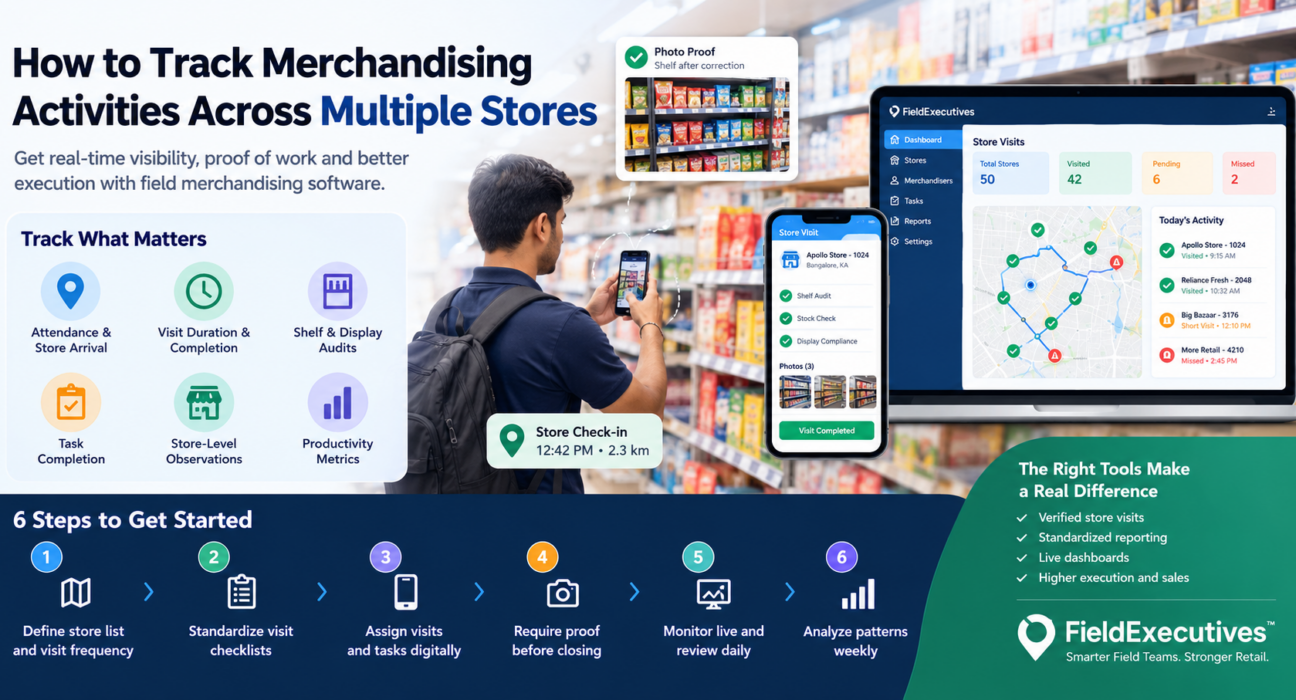
Not every data point matters. Focus on what shows whether in-store execution happened and whether it worked.
1. Attendance and Store Arrival
Confirm that the merchandiser reached the right store at the right time. Location-verified check-ins and geofencing remove guesswork.
2. Visit Duration and Completion
Time in store, visits completed against visits planned, and missed visits tell you whether the plan is being followed.
3. Shelf and Display Audits
Record what the shelf looks like on arrival and after correction. Photo evidence is the most direct way to verify this.
4. Task Completion
Track assigned tasks such as restocking requests, promotional setup or display changes. Each task should have a clear status and a timestamp.
5. Store-Level Observations
Use structured forms to capture stock gaps, competitor displays or store manager feedback in a consistent format.
6. Productivity Metrics
Visits per day, coverage across the store list and task completion rates help you compare merchandisers and spot coaching needs.
How to Track Merchandising Activities Across Multiple Stores: 6 Steps
- Define your store list and visit frequency. Group stores by importance and set how often each should be visited.
- Standardize what a good visit looks like. Create a checklist for each visit type so every merchandiser reports the same things.
- Assign visits and tasks digitally. Send each merchandiser a daily plan on their phone instead of a message thread.
- Require proof before closing a visit. Make photos, signatures or other evidence mandatory so a visit cannot be marked done without it.
- Monitor live and review daily. Watch visits as they happen and review exceptions such as missed stores or short visits at the end of each day.
- Analyze patterns weekly. Look at coverage, task completion and recurring store issues, then adjust routes, frequency and coaching.
Manual Tracking vs Field Merchandising Software
| Factor | Spreadsheets, calls and WhatsApp | Field merchandising software |
|---|---|---|
| Proof of visit | Self-reported | Location-stamped, with photo or other proof |
| Reporting speed | Hours or days | Real time |
| Consistency | Varies by person | Standard forms and checklists |
| Coverage visibility | Manual counting | Live dashboards and reports |
| Accountability | Hard to verify | Timestamped activity trail |
| Effort for managers | High (consolidation) | Lower (automatic reporting) |
Key Features to Look for in Field Merchandising Software
When evaluating options, check for these capabilities.
Live Location and Geofenced Attendance
You should see where each merchandiser is and verify that check-ins happen at the store itself. Look for protection against fake locations and device-clock tampering.
Proof of Visit
Photo, signature or OTP capture before a visit can close turns “I went” into evidence.
Custom Forms and Checklists
Every retailer audits differently. The software should let you build your own forms without coding, so shelf checks match your process.
Task and Visit Assignment
Managers need to assign work with priorities and see status in real time.
Route and Beat Planning
Planning the order of store visits reduces travel time and helps cover more stores in a day.
Offline Capability
Store basements and mall interiors often have weak signal. The app should let merchandisers capture data offline and sync later.
Reporting and KPIs
Dashboards should show coverage, completion and productivity without manual compilation.
How FieldExecutives Supports Multi-Store Merchandising
Businesses looking to simplify these processes can use field force management software such as FieldExecutives. It is built for teams that work outside the office, and its website lists retail and merchandising among the industries it supports, including shelf audits and visual merchandising.
Based on the platform’s published features, here is how it maps to merchandising work:
- Live map and GPS tracking show where each merchandiser is across your store network.
- Geofenced attendance uses server-time punch-ins and mock-location detection, so store arrival is verified.
- Proof capture (photo, signature and OTP) is required before a job closes, giving you evidence for each store visit.
- Task and visit assignment with checklists, priorities and SLA timers lets managers push work to the right person.
- AI route and beat-plan optimization helps plan store sequences so merchandisers spend less time traveling.
- Custom forms let you build your own audit and observation forms with drag-and-drop, without code.
- Offline-first mobile app keeps visits and photos safe when signal drops, then syncs on reconnect.
- Real-time KPIs and reports give managers a consolidated view instead of manual spreadsheets.
FieldExecutives states that figures such as time and cost savings on its site are illustrative, not guarantees. Results will depend on your team, store network and how consistently you enforce the process.
Best Practices for Tracking Merchandising at Scale
- Keep forms short. Long audit forms slow merchandisers down and reduce data quality. Capture what you will act on.
- Tie proof to the task. Require evidence for the specific activity, not just the visit.
- Review exceptions, not everything. Focus on missed visits, short stays and incomplete tasks.
- Share results with merchandisers. Visible metrics help people improve, and coaching works better with data.
- Start with a pilot. Roll out to a few stores or one region first, refine the forms, then expand.
- Align with store teams. Tell store managers how visits work so merchandisers get access and cooperation.
Mistakes to Avoid
- Tracking location but not outcomes. Knowing someone was in the store is not the same as knowing the shelf was fixed.
- Over-collecting data. Too many fields lead to rushed or skipped entries.
- Ignoring the field team’s experience. If the app is hard to use, adoption suffers.
- Never reviewing the data. Dashboards only help if someone acts on them weekly.
Conclusion
Tracking merchandising activities across multiple stores comes down to three things: verify presence, standardize what gets recorded, and review results quickly. Spreadsheets and chat threads cannot do this reliably once your store count grows.
Field merchandising software gives you location-verified visits, proof of work and live reporting in one system, so you can see what is happening in each store and fix gaps early. FieldExecutives offers these capabilities for field teams, including retail and merchandising operations.