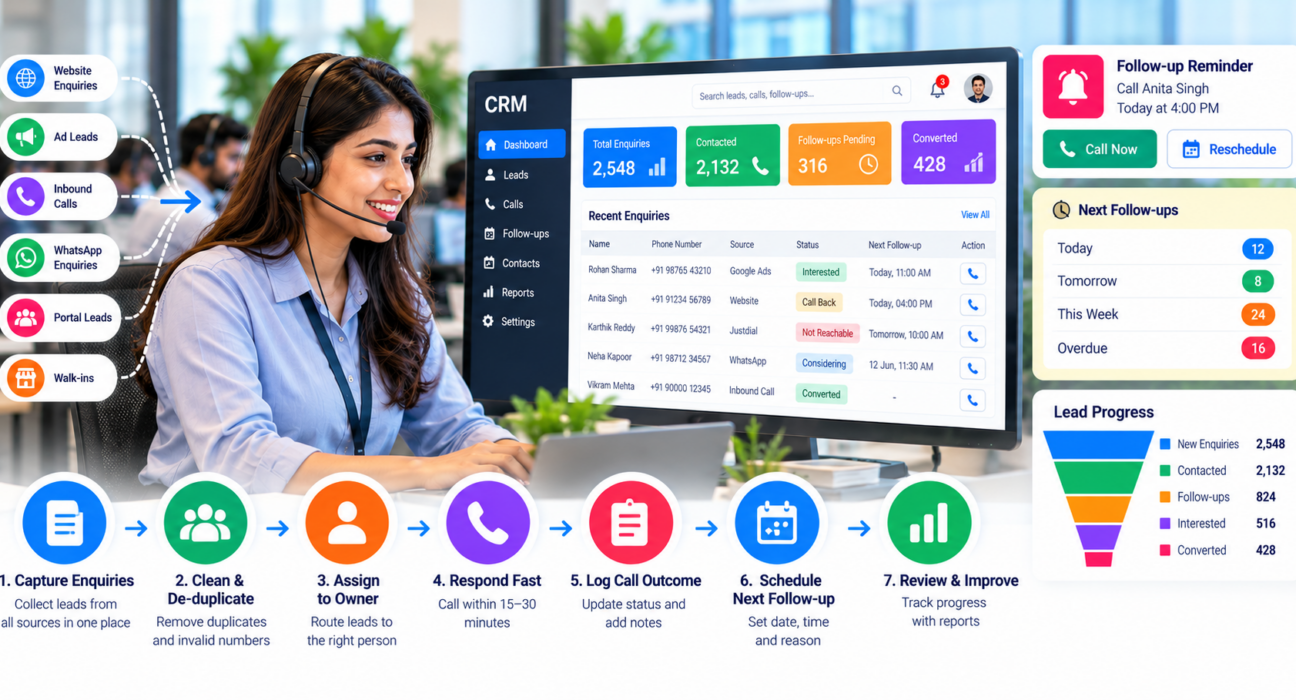
How to Manage Customer Enquiries and Sales Follow-Ups
Customer enquiry management software helps teams make sure no enquiry is forgotten. A customer sends an enquiry on Monday, your team calls on Wednesday, gets no answer and never tries again. By Friday, a competitor has already spoken to that customer.
This is the most common reason businesses lose leads. The interest was genuine, but the process failed. With the right software to manage customer enquiries and follow-ups, a team can capture every enquiry, assign it quickly and follow up until the customer decides.
This guide explains how to build that process, what to look for in a tool, and which mistakes to avoid.
How Do You Manage Customer Enquiries and Follow-Ups? (Quick Answer)
To manage customer enquiries well, collect every enquiry in one place, assign it to a specific person within minutes, and record each call outcome. Then schedule the next follow-up before ending every interaction. Reminders, call history and simple reports keep the whole process visible to managers.
What Is Customer Enquiry Management Software?
Customer enquiry management software is a tool that captures enquiries from different sources, stores them as leads, assigns them to team members and tracks every follow-up until the lead converts or is closed.
For teams that sell over the phone, it usually includes lead assignment, call logging, follow-up reminders and performance reports. Some businesses call it lead management software or a CRM. The names differ, but the job is the same: no enquiry should be lost or forgotten.
Why Enquiries and Follow-Ups Go Wrong
Most teams do not lack leads. They lack a system. These are the usual causes:
- Scattered sources. Enquiries arrive via ads, websites, listing portals, WhatsApp, calls and walk-ins, and get saved in different places.
- No clear owner. When everyone can call a lead, nobody feels responsible.
- Slow first response. Interest fades quickly, so delays cost conversations.
- Memory-based follow-ups. Callbacks written on paper or in personal notes get missed.
- Poor notes. The next caller does not know what was already discussed.
- No visibility. Managers cannot see which leads are pending or overdue.
Spreadsheets can work for a handful of enquiries a week. Once volume grows, they become hard to share, update and audit.
A Step-by-Step Process to Manage Enquiries
You can follow this process with any tool, including a spreadsheet to start with. Software simply makes it easier to follow consistently.
1. Bring all enquiries into one place
List every source your enquiries come from, such as ad forms, your website, property or business portals, and inbound calls. Route them into a single lead list, so your team works from one system rather than five.
2. Clean and de-duplicate the data
Remove duplicate numbers and wrong entries. If you make outbound calls in India, also check numbers against the Do Not Call preferences required under TRAI regulations before dialling. This protects both your team’s time and your compliance.
3. Assign every lead to one owner
Decide the rule in advance. It could be round-robin, by city, by product or by language. What matters is that every lead has a named person responsible.
4. Respond fast
Set a target for the first call, for example within 15 to 30 minutes of an enquiry during working hours. Choose a number your team can realistically meet.
5. Log the outcome of every call
After each call, record the status, such as interested, not reachable, call back later, not interested or converted. Add one or two lines of notes about the customer’s need, budget or timeline.
6. Schedule the next step before ending the call
Never leave a lead without a next action. Set a callback date and time, and put the reason in the note, such as “send quotation, call Thursday 11 AM”.
7. Review daily and weekly
Check overdue follow-ups every morning. Each week, look at how many enquiries came in, how many were contacted and how many moved forward.
A Simple Follow-Up Schedule You Can Adapt
There is no universal ideal. The right gap depends on your product and sales cycle. This table is a starting point for a typical enquiry, not a rule.
| Stage | Suggested action | Typical timing |
|---|---|---|
| New enquiry | First call and short WhatsApp or SMS | Same day, as early as possible |
| Not reachable | Retry at a different time of day | Next day |
| Interested, needs information | Send details, then call | 1–2 days |
| Considering | Gentle check-in with a useful update | 3–5 days |
| Long decision cycle | Periodic reminder | Every 1–2 weeks |
| No response after several attempts | Mark as inactive, revisit later | Review monthly |
Always respect customer preferences. If someone asks you to stop calling, record it and stop.
What to Look for in Customer Enquiry Management Software
Features matter less than fit. Check these points before you choose:
- Lead capture: Can it receive leads from the sources you already use?
- Assignment rules: Can leads go automatically to the right person?
- Call tracking: Does it log call duration, outcome and notes automatically?
- Follow-up reminders: Are there callback schedules and overdue alerts?
- Lead status and pipeline: Can you see where each lead stands?
- Mobile access: Can field and remote agents work from their phones?
- Reports: Can managers see calls made, answered and pending?
- Compliance: Does it support Do Not Call checks and secure data handling?
- Pricing clarity: Are costs per user, per feature or flat? Ask for the complete picture.
- Ease of use: Can a new telecaller learn it in a day or two?
Run a trial with real leads before committing. A tool that looks impressive in a demo may not suit your team’s daily routine.
How Different Businesses Use Enquiry and Follow-Up Systems
These are hypothetical examples to show how the process adapts.
Real estate (example). A builder receives enquiries from ads and property portals. Leads are assigned by project, site visits are scheduled as follow-ups, and callbacks continue until the buyer decides. Teams exploring this use case can look at a real estate CRM.
Education (example). A coaching institute gets admission enquiries around exam and result seasons. Counsellors follow up with students and parents on different days, and notes record course interest and fee questions. See the education CRM page for this use case.
Insurance or loans (example). An advisor tracks documents pending, renewal dates and customer questions. Reminders matter more here because decisions often take weeks.
Local services (example). A clinic or service centre uses a simple status list: new, called, appointment booked, visited. Even a basic structure prevents missed appointments.
Common Mistakes to Avoid
- Calling once and giving up. Many leads need more than one attempt.
- Running too many follow-ups. Repeated calls without new information annoy customers. Add value each time.
- Writing vague notes. “Call later” is not a plan. Record date, time and reason.
- Ignoring lead sources. If you do not know which source brings serious buyers, you cannot improve your spend.
- Not training the team. Even good software fails if agents skip logging.
- Skipping compliance. Calling numbers on Do Not Call lists can create legal and reputation risks.
- Overbuying. Choose a tool for your team’s present size and process, not an imagined future.
How TeleCallingCRM Can Help
If you are shortlisting customer enquiry management software, TeleCallingCRM is built for outbound sales and telecalling teams in India. According to its website, it includes:
- Lead management: import, assignment, scoring, de-duplication and Do Not Call checks
- Auto dialer and call tracking: every call logged with duration, outcome, recording and notes
- Follow-up scheduling: callback reminders, overdue alerts and recurring follow-ups
- Lead integrations: sources such as Facebook and Instagram Lead Ads, Google Ads, 99acres, MagicBricks, JustDial, WordPress and Google Sheets
- Sales pipeline and automations: custom stages, auto-assignment and workflow triggers
- Reports and live monitoring: agent activity, talk time and leaderboards
- Mobile app and messaging: calls and WhatsApp templates from the agent’s phone
It suits teams that sell mainly through calls, such as real estate, education, insurance, loans and B2B. If your enquiries come mostly through live chat or email support tickets, check carefully whether it matches your workflow. The features page lists current capabilities, and the pricing page explains plans. Check both for the latest details before deciding.
Frequently Asked Questions
What is customer enquiry management?
It is the process of capturing every customer enquiry, assigning it to a person, responding quickly, tracking conversations and following up until the customer buys or declines. Software helps by keeping all this information in one shared place.
How quickly should you respond to a customer enquiry?
As quickly as your team can do consistently. Faster is generally better, because the customer is still actively interested. Many teams aim for a first response within minutes during working hours, then adjust based on their own data.
How many times should you follow up with a lead?
There is no fixed number. Follow up until the lead buys, declines or asks you to stop. Space attempts out, change the time of day if the customer is unreachable, and offer something useful each time.
Can I manage enquiries in Excel or Google Sheets?
Yes, for low volumes. A sheet becomes difficult when many people edit it, when reminders are needed or when you want call history and reports. That is usually the point to move to dedicated software.
What is the difference between lead management software and a CRM?
Lead management software focuses on the stage before the sale: capturing, assigning and following up on leads. A CRM usually also covers longer customer relationships. Many tools combine both, so check actual features instead of the label.
Who needs a telecaller CRM?
Any team that makes or returns many calls to leads, such as sales, admissions, loan, insurance and recruitment teams. It is most useful when several agents share one lead list and managers need call-level visibility.
How do I choose the right software?
List your lead sources, team size, must-have features and budget. Shortlist two or three tools, test them with real leads for a few days and choose the one your team actually finds easy to use.
Conclusion
Good customer enquiry management software helps, but the process comes first: one place for leads, one owner for each, a clear note after every call and a scheduled next step.
If your team is outgrowing spreadsheets, you can see how lead follow-up software works in a demo and check whether it fits your sales process.