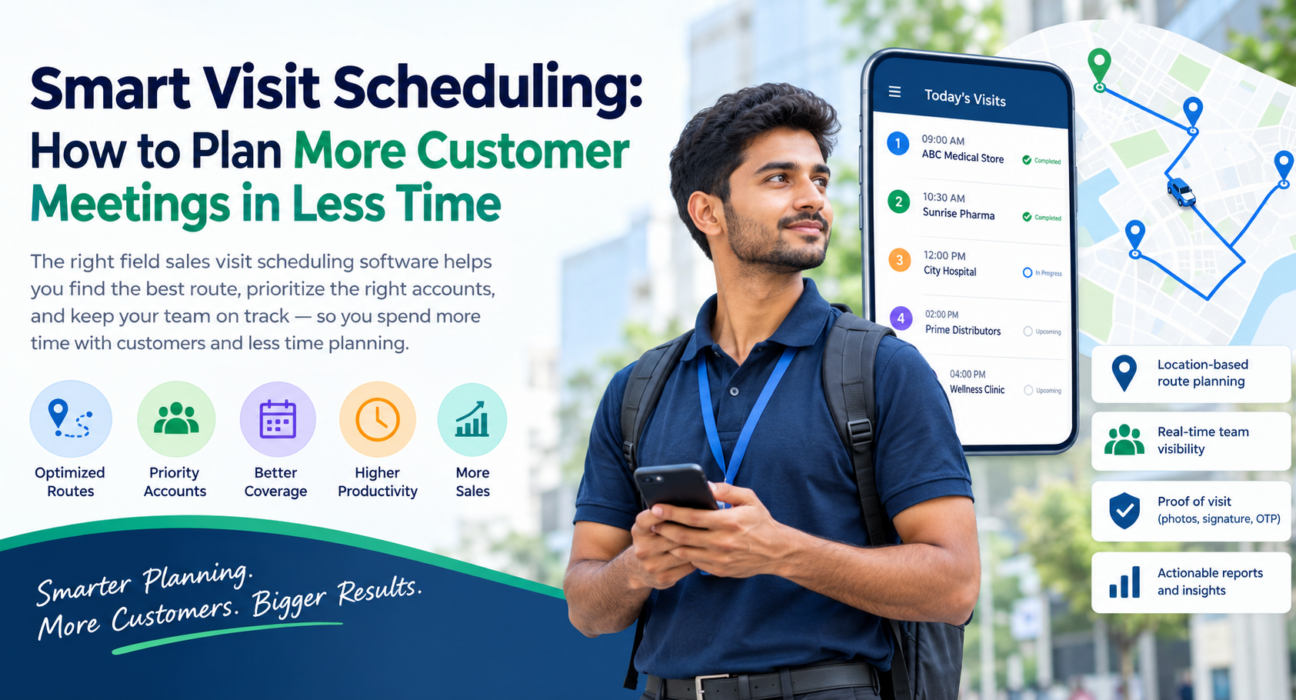
Smart Visit Scheduling: How to Plan More Customer Meetings in Less Time
A field sales rep has a fixed number of hours in a day. Every minute spent deciding where to go next, driving back across town, or waiting at a closed shop is a minute not spent with a customer.
That is the problem field sales visit scheduling software solves. It replaces ad hoc planning with a structured, location-aware schedule. In this guide, you will learn why manual scheduling holds teams back, which principles produce better visit plans, and how to put them into practice.
What Is Field Sales Visit Scheduling Software?
Field sales visit scheduling software is a tool that plans, assigns and tracks customer visits for sales reps who work outside the office. It sequences visits by location, priority and time, and records what happened at each stop.
Good software goes beyond a shared calendar. It usually combines:
- Visit and task assignment from a central console
- Route and beat plan sequencing
- Live location visibility for managers
- Proof that each visit took place
- Reports on coverage, visit counts and outcomes
A calendar tells a rep when a meeting is. Visit scheduling software helps decide which meetings to book, in what order, and how to reach them efficiently.
Why Manual Visit Scheduling Wastes Selling Time
Most teams start with a spreadsheet, a WhatsApp group or the rep’s own memory. That works for five customers. It breaks down at fifty.
Common problems with manual planning
- Zig-zag routes. Reps visit customers in the order they remember them, not the order that minimizes driving.
- Uneven coverage. High-value accounts are visited too rarely, while easy-to-reach ones get visited too often.
- Daily planning overhead. Reps or managers spend the first hour of the day building a plan.
- No visibility. Managers cannot tell whether a planned visit happened, was skipped or ran over.
- Last-minute changes. A cancelled meeting or urgent request leaves the rest of the day unplanned.
These problems rarely show up as one big loss. They show up as small, daily time leaks that add up across a whole team.
Core Principles of Smart Visit Scheduling
Software works best when the underlying logic is sound. These principles apply whether you plan with a tool or on paper.
1. Group visits by geography
Cluster customers into neighborhoods or zones and schedule them on the same day. Fewer long transfers means more time at customer sites.
2. Rank customers by value, not convenience
Decide visit frequency by account potential, such as order size, growth opportunity or renewal risk. A simple A/B/C tiering is enough to start. Top-tier accounts get the most frequent visits.
3. Fix a repeatable beat
A beat plan is a recurring schedule of customer visits assigned to a rep for a defined territory. Predictable beats help customers expect your rep, and help managers spot gaps quickly.
4. Sequence stops to cut backtracking
The order of stops matters as much as the list. Planning a sensible sequence reduces distance and makes arrival times easier to predict.
5. Leave room for the unexpected
Do not schedule every minute. Build in buffer time for traffic, long conversations and urgent calls.
How to Plan More Customer Meetings in a Day: Step by Step
To fit more customer meetings into a day, group nearby customers, prioritize high-value accounts, sequence stops to reduce backtracking, and track completion in real time. Here is the process in detail.
- Clean your customer list. Confirm addresses, contact details and opening hours for every account.
- Tier your accounts. Assign visit frequency based on value and potential.
- Divide territories. Give each rep a defined area to reduce overlap.
- Build a weekly beat plan. Spread visits across the week according to tier and location.
- Sequence each day’s route. Order stops to minimize distance and respect customer availability.
- Share the plan with reps. Send the day’s visits to their phones so nothing relies on memory.
- Capture visit outcomes. Record notes, orders, photos or follow-ups at each stop.
- Review weekly. Compare planned and completed visits, then adjust tiers and routes.
Manual Scheduling vs Visit Scheduling Software
| Area | Manual (spreadsheets, chat groups) | Visit scheduling software |
|---|---|---|
| Route planning | Based on rep memory | Location-based sequencing |
| Visit assignment | Sent by message or call | Assigned centrally to the rep’s phone |
| Manager visibility | Depends on rep updates | Real-time status and location |
| Proof of visit | Self-reported | Can be captured with photo, signature or OTP |
| Coverage tracking | Hard to compile | Reports on planned vs. completed visits |
| Handling changes | Reworked manually | Reassigned from one console |
What to Look for in Field Sales Visit Scheduling Software
Not every tool fits every team. Evaluate these capabilities before you commit.
Route and beat planning
The software should help sequence stops and organize recurring beats, not just store a list of customer names.
Mobile app that works offline
Network coverage is uneven in many territories. Reps should be able to view their plan and log visits without a connection, and sync when they are back online.
Proof of visit
Photo, signature or OTP capture, ideally combined with geofencing, gives managers confidence that a visit really happened.
Real-time visibility
A live view of who is where, and which visits are done, lets managers react during the day rather than after it.
Configurable forms and workflows
Visit needs differ by industry. A pharma rep and a distribution rep record very different things. Look for custom forms and checklists you can configure without code.
Reporting
You need to see visit counts, coverage against plan and completion rates by rep, team and territory.
Ease of rollout
If reps find the app hard to use, they will skip it. Simple interfaces and quick onboarding matter more than long feature lists.
How FieldExecutives Supports Smarter Visit Scheduling
Businesses looking to simplify these processes can use field force management software such as FieldExecutives.
FieldExecutives is built for teams that manage field employees and field operations. For visit scheduling, its relevant capabilities include:
- AI route and beat plan optimization. The platform states that optimized routes and beat plans can reduce travel time by 20–30%. FieldExecutives notes that figures such as time savings are illustrative, not guarantees, so actual results will vary by territory and team.
- Task and visit assignment. Managers create visits with checklists, priority and SLAs, and the rep receives them on their phone.
- Live team map. Managers can see rep status and movement in real time.
- Proof of visit. Reps can capture photo, signature and OTP, with geofencing and auto check-in.
- Offline-first mobile app. Reps can continue working without a network, and data syncs when they reconnect.
- Custom forms and workflows. Teams can build forms and set their own job types, checklists and approvals.
- Real-time KPIs and reports. Managers can review performance and visit data.
This lets managers move from “where is everyone?” to “which accounts need attention?”.
Practical Examples of Smarter Scheduling
These are illustrative scenarios, not customer case studies.
Scenario 1: A distribution rep with 30 outlets. Instead of choosing outlets each morning, the rep follows a weekly beat plan. Outlets are grouped by area, and each day’s stops are sequenced to avoid doubling back.
Scenario 2: A pharma rep with doctor and chemist visits. Doctors are tiered by prescribing potential, and visits are scheduled around clinic hours. Outcomes are logged at each stop, so the next visit builds on the last.
Scenario 3: A manager covering a sick rep. The manager reassigns the day’s visits from one console, and a nearby rep picks them up. The manager sees completion status live instead of chasing updates.
Teams in FMCG and pharma often have the most visit-heavy workflows. FieldExecutives publishes dedicated pages for both FMCG and distribution and pharma and medical reps.
Metrics to Track After You Improve Visit Scheduling
Measure results so you know what is working.
- Visits per rep per day: are reps completing more meetings?
- Planned vs. completed visits: how closely does execution match the plan?
- Travel time or distance per day: is the route logic paying off?
- Coverage by account tier: are top accounts getting the attention they deserve?
- Visit-to-outcome rate: how many visits lead to an order, follow-up or next step?
Track these over several weeks before drawing conclusions. Early numbers can swing with seasonality and territory changes.
Conclusion
Planning more customer meetings in less time is mostly a scheduling problem, not an effort problem. Grouping visits by geography, prioritizing accounts by value, fixing repeatable beats and tracking completion are the habits that free up selling time.
Doing all of that by hand does not scale. Field sales visit scheduling software puts those habits into a system that reps can follow and managers can monitor