How to Reduce Administrative Work for Field Operations Managers
Most field operations managers did not take the job to chase attendance on WhatsApp, reconcile expense claims in spreadsheets, or ask reps whether a visit actually happened. Yet that is where much of the day goes. Field operations management software removes most of this manual coordination by capturing attendance, visits, proof, and expenses automatically as the work happens.
This guide covers where the admin time goes, which tasks to automate first, and how to choose and roll out the right tool. You will also see how FieldExecutives fits in.
Where Does a Field Operations Manager’s Admin Time Go?
Short answer: Most admin work comes from collecting information that should have been captured automatically in the field. Managers then spend time verifying, consolidating, and reporting it.
Common time drains include:
- Attendance follow-ups: confirming who is working, where, and since when.
- Task assignment by phone or chat: sending job details one message at a time.
- Status checking: asking reps whether a visit is done.
- Expense and reimbursement handling: collecting receipts, validating claims, and chasing approvals.
- Manual reporting: merging data from spreadsheets, chats, and notebooks into a weekly report.
- Collection tracking: matching payments collected in the field with records at the office.
The root problem is a lack of real-time data, not a lack of effort. When information lives in scattered tools, the manager becomes the human link between them.
| Admin task | Typical manual approach | What it costs the manager |
|---|---|---|
| Attendance | Call, message, or paper register | Daily verification time, disputes |
| Task dispatch | Chat or phone | Repeated follow-ups |
| Visit verification | Rep’s word or later photo | Doubt, rework |
| Expense claims | Paper receipts, spreadsheets | Slow approvals, errors |
| Reporting | Manual consolidation | Hours each week |
What Is Field Operations Management Software?
Field operations management software is a platform that helps businesses plan, assign, track, and verify the work of employees who operate outside the office. It usually combines GPS tracking, attendance, task management, route planning, proof capture, expense workflows, and reporting in one system.
It differs from a basic GPS tracker. A tracker only shows where people are, while field operations management software also manages what they do. It assigns the work, guides execution, captures evidence, and turns the results into reports. This is the difference between knowing a rep is near a customer and knowing a verified visit was completed.
7 Ways to Reduce Administrative Work in Field Operations
1. Automate Field Attendance
Manual attendance is one of the most repetitive tasks a manager handles. Replace registers and chat check-ins with app-based punch-ins that record time and location automatically.
Look for server-side time stamps, geofencing, and mock-location detection. These remove the need to double-check every punch-in.
2. Assign Tasks and Visits Digitally
Instead of messaging each rep, create tasks with a checklist, priority, and deadline, and send them straight to the rep’s phone. This builds a clear record of what was assigned, to whom, and when.
Smart assignment based on location and workload also saves the planning time managers spend deciding who should go where.
3. Capture Proof of Visit Automatically
Verifying visits by phone call is slow and rarely conclusive. Require photo, signature, or OTP capture before a job can be closed.
This gives you proof of presence and proof of work without a follow-up call. It also settles disputes quickly, because the evidence is already attached to the job.
4. Plan Routes and Beats Once, Not Every Morning
Daily route planning by hand can take an hour or more. Route and beat-plan optimization builds an efficient visit order for each rep automatically.
FieldExecutives states that its AI route optimization can reduce travel time by 20–30%. It notes that savings figures are illustrative and not guaranteed, so treat them as a benchmark to test against your own operations.
5. Digitize Expense Claims and Approvals
Paper receipts and spreadsheets slow down reimbursements and invite errors. A digital workflow lets reps submit claims with photo receipts, and routes them through approval automatically.
Managers stop acting as the middleman. They review exceptions instead of every claim.
6. Replace Manual Reports with Real-Time Dashboards
If you build reports by merging spreadsheets, you are doing work software can do instantly. Real-time dashboards show who is on the field, which visits are complete, and how teams are performing against targets and SLAs.
You also get the data you need for coaching, rather than spending the week assembling it.
7. Use Custom Forms Instead of Notebooks and Chat Messages
Field teams often record visit findings, surveys, and checklists in notebooks or chat messages. Custom forms capture the same information in a structured format that can be searched and reported on.
Look for a form builder that works without code. That way you can adapt the form when your process changes, without waiting on a developer.
Which Admin Tasks Should You Automate First?
Short answer: Start with the tasks that are the most frequent and the easiest to verify, which are attendance, task assignment, and visit proof.
A practical order:
- Attendance and punch-ins. High frequency, immediate impact.
- Task and visit assignment. Removes constant back-and-forth.
- Proof of visit. Cuts verification calls.
- Expense approvals. Shortens the claim cycle.
- Reporting and KPIs. Builds on the data collected in steps 1 to 4.
Automating in this order means each step produces clean data for the next. Reporting only becomes automatic once attendance, visits, and expenses are already being captured digitally.
What to Look for in Field Operations Management Software
Not every tool reduces admin work. Some simply move it into a new interface. Evaluate options against these questions:
- Does it work offline? Field reps often work in areas with weak coverage. Data should sync when connectivity returns.
- Does it verify, or just record? Geofencing, spoof detection, and proof capture reduce manager checking.
- Is it configurable? Your job types, forms, approvals, and SLAs should be adjustable without code.
- Does it cover the full workflow? Attendance, tasks, routes, expenses, and reports in one system avoid new data silos.
- Is it simple for reps to use? Adoption fails when the app is slow or confusing in the field.
- Does it fit your industry? Needs differ between sales teams, service technicians, and collection agents.
- Is pricing predictable? Check how pricing scales as you add users.
How FieldExecutives Helps Reduce Administrative Work
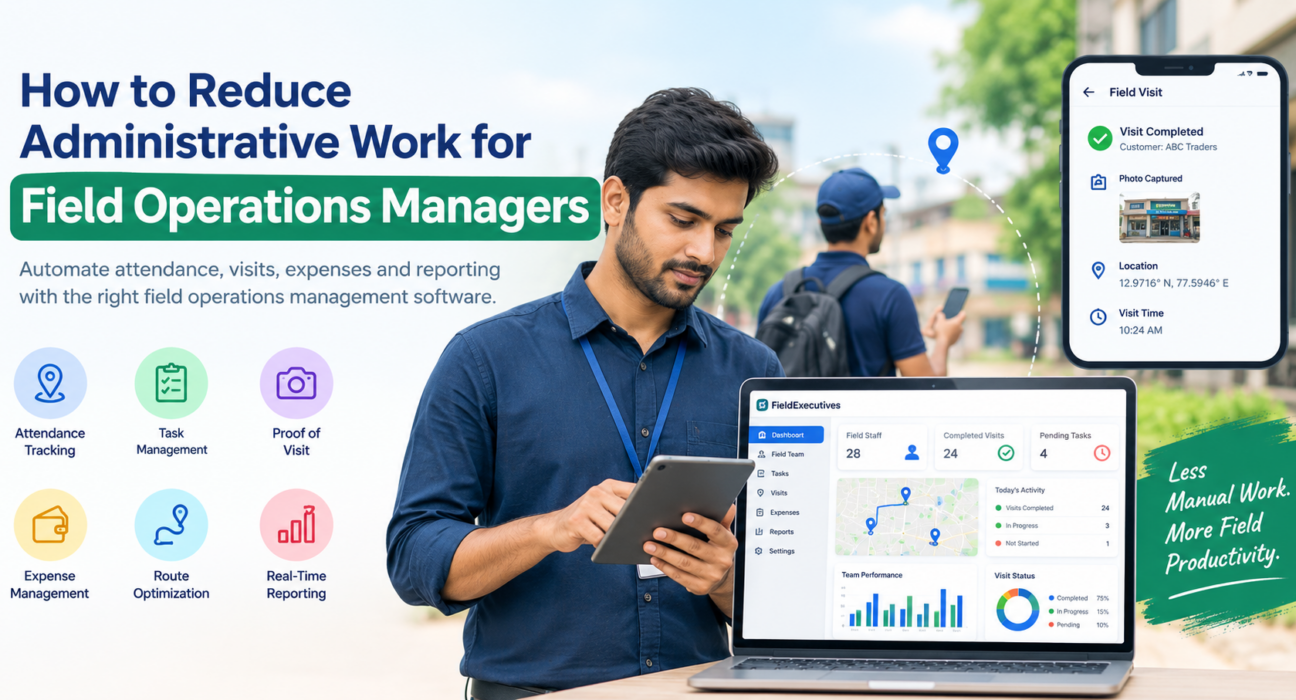
Businesses looking to simplify these processes can use field force management software such as FieldExecutives. It is built to cover the field workflow from clock-in to check-out. Based on the information published on its website, it offers:
- Live team map and GPS tracking: see every rep, route, and visit status on one real-time map.
- Geofenced attendance: punch-ins are stamped with server time and checked with geofencing and mock-location detection.
- Task and visit assignment: managers create tasks with checklists, priority, and SLAs that reach reps on their phones.
- Proof of visit: photo, signature, and OTP capture before a job closes.
- AI route and beat-plan optimization: automated visit ordering with distance and ETA per stop.
- Expense and collection tracking: receipt-backed claims through a two-level approval, and collections tracked to settlement.
- Custom forms and workflows: configurable job types, checklists, approvals, and SLAs without writing code.
- Offline-first mobile app: reps can work without a network and sync when they reconnect.
- Real-time KPIs and reports: dashboards for managers and owners.
The platform has three parts: a mobile app for field executives, a web console for managers, and an admin portal for business owners, all running on the same real-time data. Internal Link Opportunity: Explore the FieldExecutives features page
FieldExecutives also publishes industry pages for teams such as field service and repair and FMCG and distribution, which can help you check whether your workflow is covered.
Best Practices for a Smooth Rollout
Software only reduces admin work if the team actually uses it. These practices help:
- Map your current workflow first. Note where time is lost today so you can configure the tool around those gaps.
- Start with a pilot team. Test with one region or team before a full rollout.
- Configure before you train. Set up job types, forms, and approvals so training uses your real process.
- Explain the benefit to reps. Faster claim approvals and fewer check-in calls are real advantages for them too.
- Retire the old tools. If spreadsheets and chat groups stay alive, the admin work stays too.
- Review the dashboards weekly. Use the data for coaching, not just monitoring.
Keep location tracking transparent. Tell your team what is tracked, when, and why, and limit tracking to working hours.
Conclusion
Administrative work in field operations is mostly a data-collection problem. When attendance, visits, proof, expenses, and reports are captured automatically in the field, managers stop spending their days verifying and consolidating information. They can spend that time on planning, coaching, and customers.
The practical path is to start with attendance, task assignment, and proof of visit, then add expenses and reporting. Field operations management software that covers the whole workflow in one place makes each step easier and removes the need to juggle separate tools.