
Your enterprise generates thousands of documents every week. Contracts, policies, procedures, technical specifications, project plans, meeting notes, reports, presentations. These documents contain critical business knowledge, but finding the right document when you need it is often frustratingly difficult.
People spend 20 to 30 percent of their work time searching for information. They ask colleagues where documents are stored, dig through email attachments, search multiple repositories, and sometimes just recreate information because finding the original is too time-consuming. This wasted time compounds across thousands of employees into millions of dollars in lost productivity annually.
The problem isn’t lack of storage. Most enterprises have multiple document repositories. SharePoint sites, shared drives, Box, Google Drive, Dropbox, department-specific systems. The problem is that these repositories are disconnected, organized inconsistently, and lack effective search or governance. Documents are scattered across systems with no clear ownership, outdated versions persist alongside current ones, and nobody knows what the authoritative source is for anything.
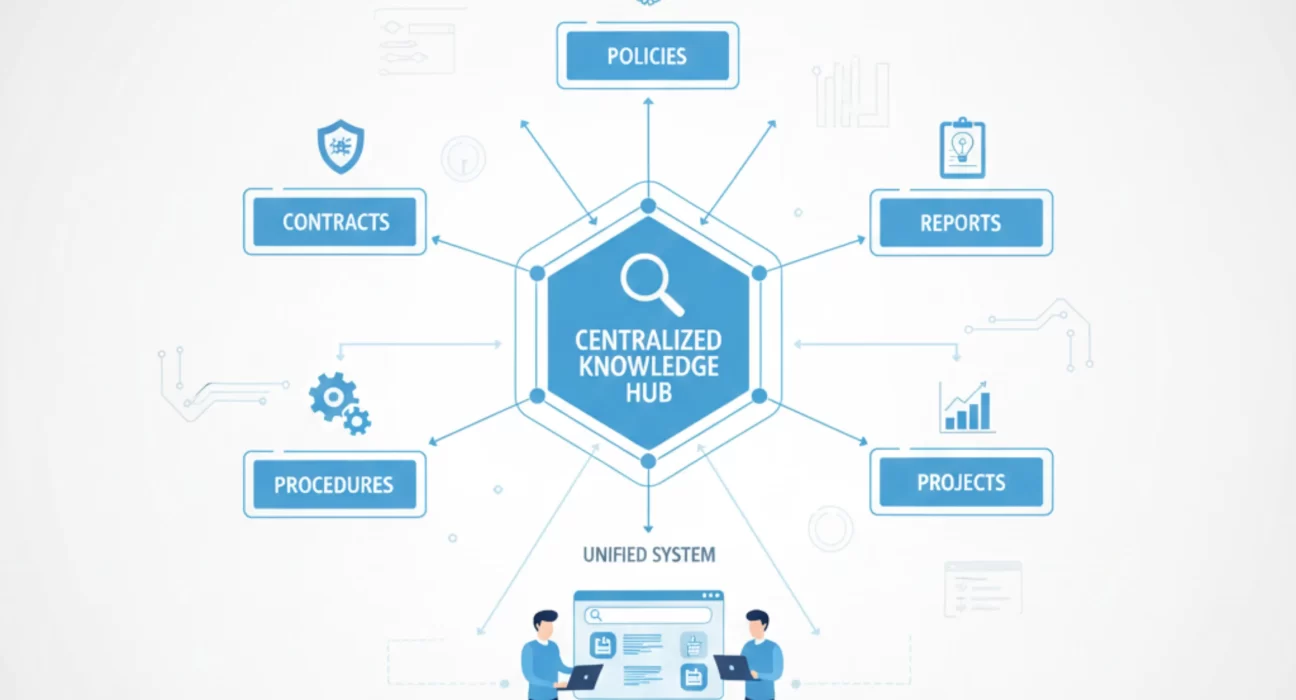
A centralized knowledge hub addresses this by consolidating documents into a structured repository with consistent organization, effective search, clear governance, and proper version control. The goal isn’t just storing documents. It’s making organizational knowledge accessible so people can find what they need quickly and trust that what they find is current and accurate.
Why Document Chaos Happens at Scale
Small organizations can manage documents informally. Everyone knows where things are stored, who created what, and which version is current. This breaks down completely as organizations grow.
Different departments develop their own systems and organizational schemes. Finance structures documents by fiscal year and cost center. Legal organizes by matter type and client. Operations uses project-based folders. Engineering organizes by product and component. Each makes sense within that department, but enterprise-wide consistency doesn’t exist.
Multiple platforms emerge through different decisions at different times. One business unit standardized on SharePoint years ago. Another chose Box for better collaboration features. A third uses Google Drive because they’re primarily on Google Workspace. IT maintains shared network drives as legacy infrastructure. Now you have documents everywhere with no unified access or search.
Permissions and access control become inconsistent. Some repositories use role-based access, others use individual permissions, and some have almost no access control at all. People either can’t access documents they legitimately need or can access sensitive documents they shouldn’t see. Neither situation is acceptable, but fixing it requires reconciling different permission models across multiple platforms.
Version control happens informally if at all. People save documents as “draft,” “final,” “final v2,” “final revised,” “final revised FINAL.” Multiple versions exist in different locations. Nobody is certain which version is authoritative. Teams sometimes work from different versions of the same document without realizing it.
Search doesn’t work across repositories. Searching SharePoint doesn’t return results from Box. Searching Box doesn’t find documents on shared drives. Enterprise search tools exist but often don’t index all repositories or don’t handle permissions correctly, returning results for documents the searcher can’t actually access.
What Centralized Document Management Actually Provides
A proper enterprise document management system consolidates documents into a unified repository with consistent structure, effective search, clear governance, and proper version control.
Centralized storage doesn’t necessarily mean one physical repository. It means a unified interface where users access all documents regardless of where they’re physically stored. The system might integrate with existing repositories rather than requiring mass migration. The key is unified access and search, not forcing everything onto one platform.
Consistent organization uses a defined taxonomy that makes sense enterprise-wide. Top-level categories might be by business function or process. Sub-levels provide more specificity. The structure should be deep enough to organize documents logically but not so deep that navigation becomes difficult. Most organizations need three to five levels, not ten.
Effective search goes beyond simple keyword matching. Full-text search examines document content, not just filenames. Metadata tagging allows filtering by document type, department, date, project, or other attributes. Search results should respect permissions so users only see documents they can access. Relevance ranking surfaces the most useful results first.
Version control maintains history of document changes while making current versions clearly identifiable. The system tracks who changed what and when. Users can access previous versions if needed but default to current. Documents can be checked out for editing to prevent conflicting simultaneous changes. Version history provides audit trail for compliance and dispute resolution.
Permissions management controls who can view, edit, or delete documents based on roles and organizational hierarchy. The permission model should be intuitive enough that document owners can manage access without IT involvement for routine changes. Sensitive documents should have tighter controls with approval workflows for access requests.
Workflow capabilities route documents through review and approval processes. Contract review, policy approval, specification sign-off. These workflows ensure proper review happens, maintain records of who approved what, and prevent unapproved documents from being considered final.
The Migration Challenge Nobody Wants to Discuss
Moving documents from scattered repositories into a centralized system is where many implementations bog down. Organizations underestimate the volume, complexity, and effort required.
Content audit is the first step. How many documents exist across all repositories? What types? What’s their age and relevance? Which documents are actively used versus obsolete? This audit reveals the scope of migration work and identifies documents that shouldn’t be migrated because they’re outdated or redundant.
Cleanup should happen before migration. Delete obsolete documents. Consolidate duplicate versions. Archive old content that must be retained for compliance but isn’t actively needed. Organizations sometimes migrate everything and plan to clean up later. Later never comes, and you’ve moved the problem to a new system without solving it.
Metadata definition determines how documents will be tagged and organized in the new system. Document type, owner, creation date, review date, retention period, confidentiality level. Good metadata makes documents findable. Poor or incomplete metadata recreates the old problems in the new system.
Metadata application means tagging documents with the defined metadata. For tens or hundreds of thousands of documents, this is substantial work. Some metadata can be applied programmatically based on source location or filename patterns. The rest requires human review, which takes time and costs money.
Permission mapping translates existing permissions to the new system’s model. This isn’t always straightforward when source systems use different permission schemes. Some decisions require judgment about appropriate access levels in the new environment.
Phased migration reduces risk by moving content gradually rather than attempting big bang cutover. Migrate by department, document type, or date range. Each phase provides learning that improves subsequent phases. Users adjust gradually rather than facing sudden wholesale change.
The migration work typically takes longer than organizations expect. For a large enterprise with millions of documents, realistic migration timelines run six to twelve months. Organizations that try to compress this create data quality problems, incomplete migrations, or abandonment of cleanup efforts in favor of just moving everything.
Search and Retrieval That Actually Works
The value of centralized document management depends heavily on whether people can find what they need quickly. Poor search capabilities undermine the entire investment.
Full-text indexing examines document content, not just filenames or metadata. This allows finding documents based on concepts or specific language within them. The indexing needs to handle various file formats including Office documents, PDFs, images with OCR, and structured data formats.
Metadata filtering lets users narrow results by document attributes. Show only contracts from last two years. Show only engineering specifications for this product line. Show only documents owned by this department. Effective filtering turns thousands of results into manageable sets.
Relevance ranking uses algorithms to surface most useful results first. Documents accessed frequently, created recently, or matching multiple search terms rank higher. Users should find what they need in the first page of results, not the fifth page.
Saved searches and alerts support users who need regular updates on specific topics or document types. Save the search criteria and run it periodically. Get alerts when new documents match criteria. This is particularly valuable for compliance, competitive intelligence, or project tracking.
Preview capabilities let users see document content without downloading or opening. Quick preview shows whether this is the right document before investing time in full review. This speeds the search process significantly.
Recent and frequent documents provide shortcuts for commonly accessed content. Show documents the user accessed recently. Show documents accessed frequently across the organization. These shortcuts help users bypass search for routine access.
The search experience should be Google-simple on the surface while providing powerful capabilities for users who need them. Basic search should work well for common cases. Advanced search with filters and operators should be available for complex queries.
Governance and Ownership That Sustains Quality
Document management systems degrade over time without proper governance. Documents become outdated, organization deteriorates, permissions sprawl, and you’re back where you started.
Content ownership assigns clear responsibility for each major document category or repository section. That owner ensures content remains current, reviews and updates documents regularly, manages permissions appropriately, and removes obsolete content.
Review cycles require that documents be reviewed periodically to confirm they’re still accurate and relevant. The review period varies by document type. Policies might need annual review. Technical specifications might need review after each product release. Meeting notes probably don’t need review at all.
Retention policies specify how long different document types must be kept for legal and compliance reasons and when they can be deleted. These policies need to match regulatory requirements while avoiding indefinite retention of documents with no ongoing value.
Archival processes move inactive documents that must be retained for compliance to archive storage with different access and search capabilities. This keeps the active repository manageable while maintaining compliance with retention requirements.
Audit capabilities track document access, modifications, and permissions changes. This supports compliance, security investigations, and quality control. Regular audit report review identifies unusual patterns or potential security issues.
Training ensures users understand how to use the system effectively. How to search. How to organize documents. How to apply metadata. How to manage permissions. Poor training leads to poor adoption and continued reliance on old informal methods.
Integration With Business Processes
Document management shouldn’t be isolated from the business processes that create and use documents. Integration makes documents accessible in context rather than requiring separate access to the document repository.
Contract management integration makes contracts accessible from CRM or procurement systems where they’re relevant to customer or vendor context. Sales team reviewing customer relationship sees active contracts. Procurement reviewing vendor sees vendor agreements. The documents live in the document management system but appear where they’re needed.
Project management integration links project documents to project records. Project plans, specifications, meeting notes, deliverables all accessible from the project management tool. Team members don’t switch between systems to access project content.
HR integration makes policies, procedures, and forms accessible from the HRIS. Employees finding information about benefits see relevant policy documents. Managers completing performance reviews access rating guidelines and templates.
Workflow integration allows business processes to interact with documents. Contract approval workflow routes documents through necessary reviewers. Change management process attaches specifications and impact assessments. Incident response process captures investigation notes and remediation plans.
These integrations require API capabilities and development work, but they’re what make document management valuable in daily operations rather than just a separate repository people need to remember to check.
How Ozrit Implements Enterprise Document Management
Ozrit’s approach to document management implementation starts with comprehensive assessment of your current state. How many documents exist across all repositories? What document types are most important to your operations? What are current pain points with findability and organization? This assessment shapes realistic scope and timelines.
The design phase defines taxonomy structure, metadata model, permission framework, search capabilities, retention policies, and integration requirements. This design is specific to your business needs and organizational structure, not generic best practices that might not fit your environment.
A senior program director owns the implementation from assessment through migration completion and stabilization. The typical implementation team includes eight to twelve people: content strategists who design taxonomy and metadata, migration specialists who handle content movement and cleanup, technical architects who design integration and search, and change management professionals who drive adoption.
Realistic timelines for comprehensive enterprise document management implementations run nine to fifteen months from kickoff to final migration completion. This includes assessment, design, platform selection or configuration, pilot migration, full migration in phases, integration development, and user training. Organizations with particularly large document volumes or complex integration needs might require longer.
The phased migration approach starts with one business unit or document type, validates the approach, addresses issues discovered, then expands to additional content. This reduces risk and allows learning from early phases to improve later phases.
Ozrit provides ongoing support after migration because document management requires continuous governance. Regular content reviews, taxonomy refinement, search optimization, permission audits, and user training updates. This sustained engagement prevents the system from degrading into the same chaos you’re trying to escape.
The goal is creating sustainable document management practices that maintain quality and findability long-term. This requires proper initial implementation plus ongoing governance and continuous improvement based on how users actually interact with the system.
The Cost of Information Chaos
Poor document management costs more than most organizations realize. The direct cost is time wasted searching for documents. At $100,000 average fully loaded cost per knowledge worker, 25 percent of time spent searching is $25,000 per person annually. Across 1,000 knowledge workers, that’s $25 million per year in lost productivity.
Indirect costs include duplicated work when people can’t find existing documents and recreate them, compliance failures when required documents can’t be located during audits, poor decisions made with incomplete information because relevant documents weren’t found, and delayed projects when critical information takes weeks to locate.
Risk costs come from inappropriate document access creating data breaches, outdated documents being used as current creating operational errors, and missing documentation creating liability in legal proceedings.
The business case for proper document management is straightforward when you honestly assess current costs. The implementation investment is substantial, but payback typically occurs within 18 to 24 months through productivity gains alone, before considering risk reduction and decision quality improvements.
Your document management approach reflects how seriously you take organizational knowledge as a business asset. Organizations that invest in proper document management signal that institutional knowledge matters and should be preserved and accessible. Organizations that tolerate document chaos signal that information management is an afterthought. That difference shows up in operational efficiency, decision quality, and employee frustration every single day.